Chapters
Getting started with Catena
Catena is the small language you use to write sequences inside Castiel. A sequence is a short list of instructions the calculator runs for you - prompt for a price, add the tax, show the total - saved so you can run it again tomorrow without re-typing anything. If you have ever recorded a set of calculator keystrokes, filled in a spreadsheet formula, or written a few lines of BASIC, Catena will feel familiar within minutes.
This is the first chapter of the Catena series. It explains what the language is, why it is safe to run a sequence someone else wrote, and walks you through your very first sequence. It teaches the ideas first; the later chapters fill in the details of the syntax. You reach Catena from Programming mode on the mode selector - that chapter covers the editor itself. Here we are learning the language.
What Catena is (and is not)
Catena is a sequencer for a calculator, not a general-purpose programming language. That distinction shapes everything about it. A sequence is a straight run of simple instructions - one instruction per line - executed on top of Castiel's math engine. It has real named variables, exact money arithmetic, units, dates, and the ability to call other sequences, but it deliberately leaves out the machinery of large software: there are no classes, no modules, no threads, and - importantly - no way to touch your files, the network, or your devices on its own.
That narrow focus is the point. Catena aims to be the best possible language for calculation sequences, and nothing else. Because it does one thing, it can afford to be tiny enough to hold in your head and forgiving enough that a beginner is not punished for a stray space or a missing bracket.
It is written for four kinds of user at once:
- Accountants, engineers, and business users who want exact money math, units, and dates, and results that recompute when an input changes - the habits they already have from spreadsheets.
- Learners aged 12 and up, who get a small, visible mental model and syntax that does not bite.
- People coming from calculator languages (HP, TI-BASIC, Casio), who will recognise
PROMPT,STO, andRCLbut now get real variable names and a fast engine behind them. - Professional developers, who will find terse forms and precise typing available whenever they want them.
The four ideas behind the language
You do not need these to write your first sequence, but they explain why Catena behaves the way it does, and they will make every later chapter easier.
It is readable, one line at a time. A sequence is a list of lines, and one line is one instruction. Lines do not end in a semicolon or a colon - a line break ends the statement. As you write, the editor evaluates each line and shows you the value it produced right beside it, so you never have to guess what the calculator understood. This live feedback is the headline feature: you can predict what every line does because you can see what every line did.
It is forgiving where intent is clear. Any run of spaces is treated as one space; the space after a comma is optional; a trailing comma is ignored; and the brackets around a command's arguments are optional, so DISPLAY("Total") and DISPLAY "Total" mean the same thing. Where a mistake could silently change a result, though, Catena is strict - grouping parentheses inside a formula are never optional, because (a + b) / c and a + b / c are genuinely different sums and the calculator will not guess which you meant.
It is exact by default. Ordinary numbers in Catena are exact decimals, not the binary floating-point that makes 0.10 + 0.20 drift away from 0.30. Because the audience includes people counting money, exactness is the default and you have to opt out of it, never in. (Functions that cannot be exact - sine, a logarithm, an irrational square root - return an ordinary decimal result, covered in Types and formatting.)
It is safe by construction. This is worth stating plainly, because it is what makes sharing sequences comfortable. What Catena cannot express is a feature:
- No file, network, or device access on its own. A sequence reaches the outside world only through a connector - a capability the app deliberately publishes, such as a currency-rate lookup - and never any other way.
- Bounded execution. Loops and repeated calls are capped, so a sequence cannot hang your calculator in an endless loop; overrunning the cap is a friendly error, not a freeze.
- Deterministic results. The same inputs give the same outputs every time. (A connector's data can change - today's exchange rate is not yesterday's - but that data is always fetched explicitly, never behind your back.)
The practical upshot: you can open and run a sequence a colleague sent you the same way you would open a spreadsheet. It can compute and it can ask you questions, but it cannot rummage through your disk or quietly reach the internet.
Your first sequence
Here is a complete sequence. It asks for a net price, adds 23% tax, and shows the total:
PROMPT "Net price?" -> price
price × 1.23 -> total
DISPLAY "Total with tax: " total
Three lines, and each one reads as an action. Walk through them:
Line 1 - ask for a value. PROMPT shows the text "Net price?" and waits for you to type a number. The -> arrow is Catena's assignment: it means "put the result on the left into the name on the right." So the number you type is stored in a variable called price. (-> looks like a single arrow in the editor. If you prefer the word, ASK does exactly the same job as PROMPT - the language accepts several spellings of the same thing and remembers the one you like.)
Line 2 - compute. price × 1.23 multiplies your price by 1.23, and -> total stores the answer in a new variable, total. Variables are created the moment you first assign to them; there is no separate step to declare them. Read the whole line left to right, the way you would say it aloud: "take price times 1.23, put it in total." (× is the multiply key; if you are typing on a keyboard, * works too.)
Line 3 - show the result. DISPLAY puts text on the calculator's main output. Here it shows the label "Total with tax: " immediately followed by the value of total, so the user reads something like Total with tax: 123.00.
A useful guard rail is built in: you can only read a variable you have already assigned. If line 3 said DISPLAY totl by mistake, Catena would stop before running and tell you "totl was never assigned. Did you mean total?" - a typo can never quietly become a brand-new empty variable.
Sending results to the paper tape. DISPLAY shows the current answer. When you want a permanent line in the shared paper tape - the running record every mode shares - use PRINT instead, or use OUT to do both at once (show it and record it). A sequence that computes an invoice can PRINT each step so the finished tape is a complete, auditable trail.
Three ways to write the same sequence
The three lines above are the sequence's canonical text - the form it is stored in and the form this manual uses. But you do not have to type that text if you would rather not. Programming mode offers three views of one and the same sequence, and you switch between them with a control in the editor header:
- Calculator - build the sequence by pressing keys, the way you would work an ordinary calculator. Each action you take is recorded as a step. This is the gentlest way in: you already know how to press
PROMPT, a number, andDISPLAY. - Listing - type the sequence as text in a code editor, exactly as printed above, with line numbers and a per-line value preview beside each line.
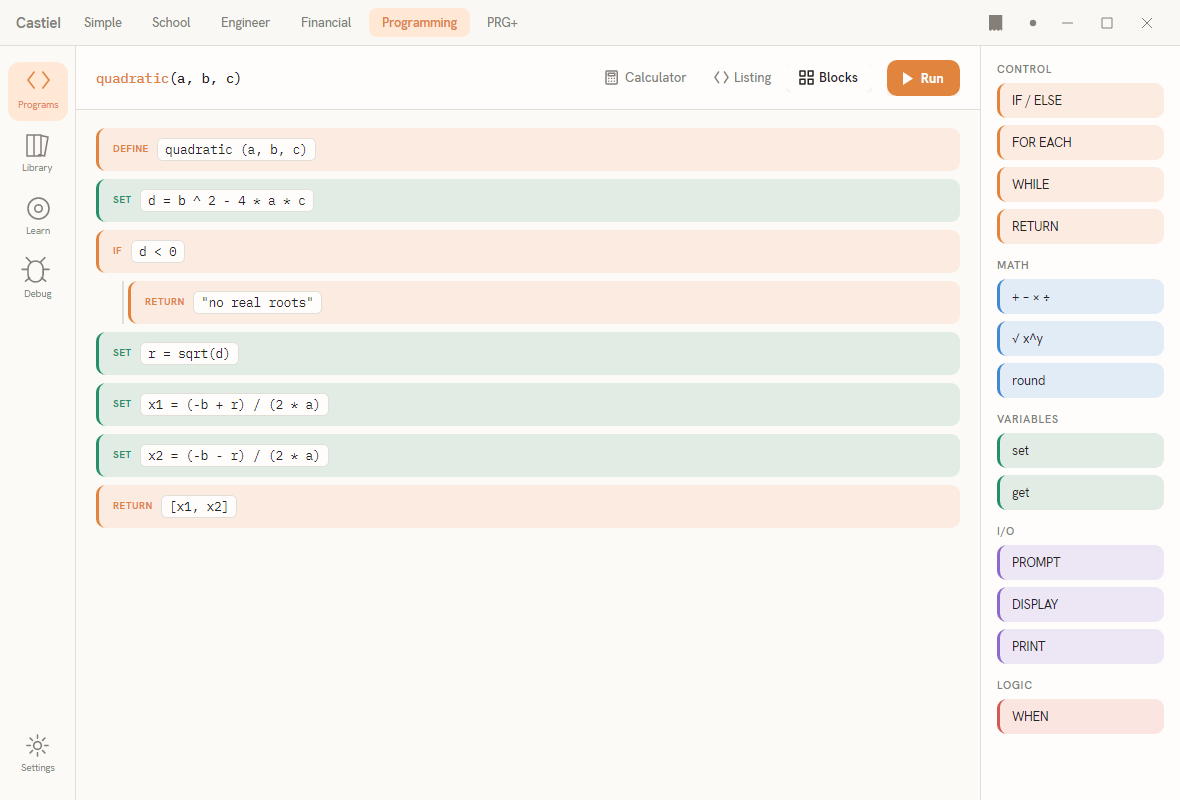
- Blocks - assemble the sequence from labelled visual blocks you pick from a palette (shown in the screenshot at the top of this chapter), with nesting drawn for you. Good for seeing the structure at a glance and for building without typing.
These are not three different sequences or three different languages - they are three lenses on the same stored sequence. Write a loop in Blocks, switch to Listing, and you see its text; press keys in Calculator, switch to Blocks, and you see the blocks. Pick whichever view suits the moment. Programming mode covers the editor, the views, and the debugger in full.
Saving and sharing
A single sequence is saved as a .cat file. A collection of sequences that work together is a concatenation, packaged as one portable file: .cats for a library of sequences (opening it runs nothing - it just makes the sequences available) and .catx for a runnable bundle (opening it runs the sequence marked as the default). The two are the same bundle; only the extension and what happens on open differ. Files and sharing explains the file types, libraries, and how to hand a sequence to someone else.
Where to go next
- Language basics - lines, variables, the
->arrow, comments, and the everyday commands (PROMPT,DISPLAY,PRINT,OUT). - Types and formatting - exact numbers versus decimals, money and units, dates, and the
ASoperator for converting and formatting values. - Sequences and functions - writing reusable sequences, passing values in and out, and calling one sequence from another.
- Files and sharing -
.cat,.cats, and.catx, libraries, and sharing your work safely. - Programming mode - the editor itself: the Calculator, Listing, and Blocks views, and the debugger.