Chapters
Logarithms and exponentials
A logarithm answers one question: "what exponent produces this number?" If you know that 10 raised to some power gives 1000, the logarithm tells you the power is 3. Logarithms and their partner, the exponential function, are the tools for anything that grows or shrinks by multiplying - money earning interest, populations, radioactive decay, sound, acidity. This chapter builds the idea from powers first, then shows exactly how to compute every logarithm and exponential on the Castiel calculator.
If exponents are new to you, read Powers and roots first. If you already know the theory and just want the keys, jump to Computing logarithms in Castiel.
What a logarithm is
A logarithm undoes a power. Raising to a power takes a base and an exponent and gives a result: 10³ = 1000. A logarithm runs that backwards - it takes the base and the result and gives back the exponent:
10³ = 1000, solog₁₀(1000) = 3.10² = 100, solog₁₀(100) = 2.10¹ = 10, solog₁₀(10) = 1.10⁰ = 1, solog₁₀(1) = 0.
Read log₁₀(1000) = 3 out loud as "the log, base 10, of 1000 is 3" - meaning "the power you must raise 10 to, to get 1000, is 3." The small subscript is the base: the number being raised to a power. Every logarithm has a base, and you must know which base is in play before the answer means anything.
Logs turn multiplication into addition. Because 100 × 1000 = 10² × 10³ = 10⁵, the logs add: 2 + 3 = 5. This is the whole reason logarithms were invented - they convert hard multiplication into easy addition. It is also why they appear in every scale that spans a huge range, from earthquakes to sound.
You can only take the log of a positive number. No power of a positive base ever produces zero or a negative number, so log(0) and log(-5) have no real answer. The calculator reports a domain error rather than a made-up value.
Common, natural, and general bases
Three bases matter in practice, and Castiel gives each its own name.
Common logarithm - base 10. Written log on the calculator (and log₁₀ in textbooks). This is the everyday scientific logarithm, matching the powers-of-ten you use for scientific notation. log(1000) = 3.
Natural logarithm - base e. Written ln. Its base is the number e ≈ 2.71828…, an irrational constant as fundamental as π. The number e is the natural rate of continuous growth: if something grows smoothly and continuously (rather than in discrete jumps), e is the base that describes it, which is why ln is the logarithm of choice throughout science, calculus, and finance. ln(e) = 1, because e¹ = e.
A general base. Sometimes you need a base that is neither 10 nor e - base 2 in computing, for instance. For that Castiel provides log_a(base, value): the first argument is the base, the second is the number. log_a(2, 8) = 3 because 2³ = 8.
The exponential function is the inverse of ln. Just as ln undoes raising e to a power, the exponential function exp does the raising: exp(x) means eˣ. The two cancel out - ln(exp(x)) = x and exp(ln(x)) = x - exactly the way squaring and square-rooting cancel. This pairing is what lets you solve growth problems: take a ln to find an unknown exponent, or an exp to find an unknown amount. Castiel also offers exp10 for 10ˣ (the inverse of log) and exp2 for 2ˣ.
The log laws
Because logs turn multiplying into adding, three rules - the log laws - follow. They are properties of logarithms, useful for understanding and for algebra by hand. They are not calculator keys: you do not press a "product law" button. The calculator applies them internally; you use them to reason about answers.
- Product law:
log(a × b) = log(a) + log(b). The log of a product is the sum of the logs. - Quotient law:
log(a / b) = log(a) − log(b). The log of a quotient is the difference of the logs. - Power law:
log(aⁿ) = n × log(a). A power inside a log comes out as a multiplier.
The power law is the workhorse for solving equations. If an unknown sits in an exponent - say 2ˣ = 50 - take the log of both sides and the power law drops the x down to the front: x × log(2) = log(50), so x = log(50) / log(2). That last step, a log divided by a log, is exactly what log_a does in one move: log_a(2, 50).
All three laws hold in any single base, as long as you stay in that base throughout.
Where logarithms show up
Logarithmic scales compress enormous ranges into readable numbers, which is why so many real-world measurements are logs in disguise:
- pH (acidity) is
−log₁₀of the hydrogen-ion concentration. Each whole step down the pH scale means ten times more acidic - pH 4 is ten times as acidic as pH 5. - Decibels (sound) measure loudness on a log scale, because the ear responds to ratios, not absolute differences. A 10-decibel rise is a tenfold increase in intensity.
- The Richter scale, star brightness, and signal strength work the same way: each unit is a fixed multiplier, so a log turns the multiplier back into a simple step.
- Growth and decay - compound interest, population, radioactive half-life, cooling - are all governed by
expandln. You useexpto project a quantity forward in time andlnto solve for the time or rate that produces a given amount.
Computing logarithms and exponentials in Castiel
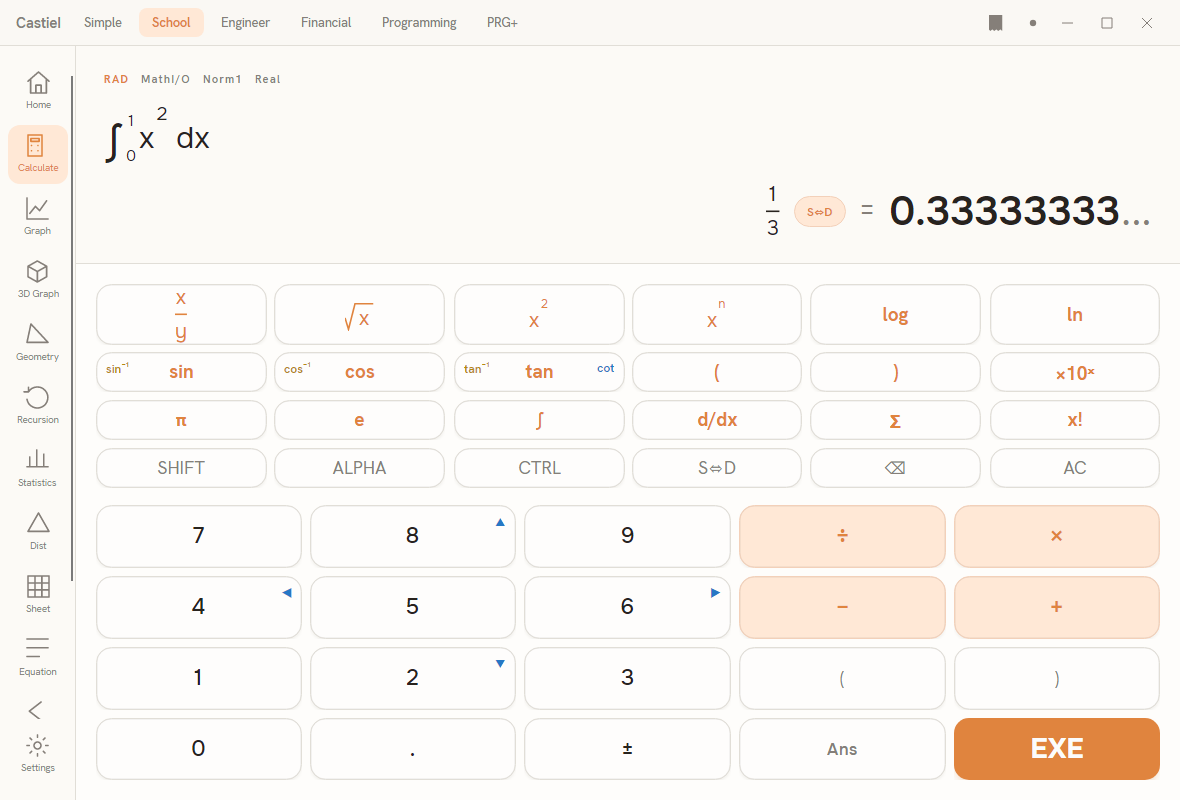
Every example below uses the School calculator, but the log and exponential keys behave the same in every mode that shows them.
The keys. The scientific keypad has two dedicated logarithm keys, log (base 10) and ln (natural), side by side. Press one, type the number, close the bracket, and press =. For raising ten to a power there is a ×10ˣ key. The constant e has its own key on the keypad (next to π), so you can drop Euler's number into any expression directly.
Functions you type by name. The general-base logarithm and the other exponentials do not have their own keys - type their names straight into the entry line, which the calculator accepts as typed text:
log_a(base, value)for a logarithm in any base.exp(x)foreˣ, the natural exponential.exp2(x)for2ˣ.
You can also type log(...) and ln(...) by name instead of pressing the keys; the uppercase spellings LOG and LN work too.
Exact versus decimal. Some results are whole numbers or simple fractions; most logarithms are not. Press the S⇔D key to toggle a result between an exact form (a fraction or a multiple of a constant) and a plain decimal. log(1000) is exactly 3, but log(50) is an unending decimal near 1.699 with no tidy exact form - the toggle simply shows the decimal.
The logarithm functions
| Function | What it is | Keypad / typed form | Arguments |
|---|---|---|---|
| Common logarithm | log base 10 - "what power of 10?" | log key, or type log(...) (also LOG) |
one, must be positive |
| Natural logarithm | log base e - "what power of e?" |
ln key, or type ln(...) (also LN) |
one, must be positive |
| General logarithm | log of a value in any base | type log_a(base, value) (also logBase(...)) |
two: base then value |
Each logarithm requires a positive input. log(0), ln(-2), or a log_a with a base of 0, 1, or a negative number is a domain error, because no real exponent produces such a result.
The exponential functions
An exponential raises a fixed base to the power you supply - the inverse direction of a logarithm.
| Function | What it is | Keypad / typed form | Arguments |
|---|---|---|---|
| Natural exponential | eˣ - the inverse of ln |
type exp(...) (also EXP) |
one |
| Power of ten | 10ˣ - the inverse of log |
×10ˣ key, or type exp10(...) |
one |
| Power of two | 2ˣ - the inverse of log_a(2, …) |
type exp2(...) |
one |
Each takes one argument and accepts any real number, positive or negative; the result is always positive. A very large exponent overflows what the calculator can represent (roughly exp(710), exp10(308), or exp2(1024)), and Castiel reports an overflow error rather than returning a meaningless figure.
Worked examples in Castiel
Example 1 - read an exponent straight off (log). How many digits does 2¹⁰⁰ have, roughly? The number of digits of a positive whole number is one more than the whole-number part of its common logarithm, and by the power law log(2¹⁰⁰) = 100 × log(2).
- Press the
logkey, type2, close the bracket, press=. The result is about0.30103. - Type
× 100 =(or start over as100 × log(2)). The result is about30.103. - Take the whole-number part and add one:
2¹⁰⁰has 31 digits. You never had to compute the 31-digit number itself - the logarithm handed you its size directly.
Example 2 - solve a growth problem (exp and ln). A colony of bacteria grows continuously at 8 % per hour, starting from 500 cells. First: how many are there after 5 hours? Then: how long until it reaches 2000?
Continuous growth follows amount = start × exp(rate × time), with the rate as a decimal (0.08).
Forward, with exp:
- Type
500 ×, thenexp(, type0.08 × 5, close the bracket, press=. This computes500 × exp(0.4). - The result is about
745.9. After 5 hours there are roughly 746 cells.
Backwards, with ln: to find the time, rearrange 2000 = 500 × exp(0.08 × t). Divide first: 2000 / 500 = 4, so exp(0.08 × t) = 4. Taking ln of both sides undoes the exp: 0.08 × t = ln(4), so t = ln(4) / 0.08.
- Press the
lnkey, type4, close the bracket, press=. The result is about1.3863. - Type
÷ 0.08 =. The result is about17.33. The colony reaches 2000 cells after roughly 17.3 hours.
The pattern is the one to remember: use exp to move a growing quantity forward, and ln to solve backward for a rate or a time trapped in the exponent.
See also
- Powers and roots - exponents and roots, the operations that logarithms invert.
- Trigonometry - the other main family of scientific functions.
- The School calculator - the surface used in the examples above.