Chapters
The School Recursion app
Recursion is where a sequence defines itself. Instead of writing a term as a formula in n, you write it in terms of the terms that came before it: each new value is computed from one or two earlier ones. The School Recursion app takes such a rule, plus its starting value, and builds the sequence out for you - as a table of terms, as a graph, and as a step-by-step derivation you can study or send to the paper tape. You reach it from the Recursion tile on the left apps rail.
Use it whenever a problem is naturally "the next one depends on the last one": simple interest that adds a fixed amount each period, a population that halves each year, the Fibonacci numbers, or any classroom exercise about arithmetic and geometric sequences. The app also answers the question a table alone cannot: does this sequence settle down, run away, or bounce forever? It reports that as a plain-language verdict.
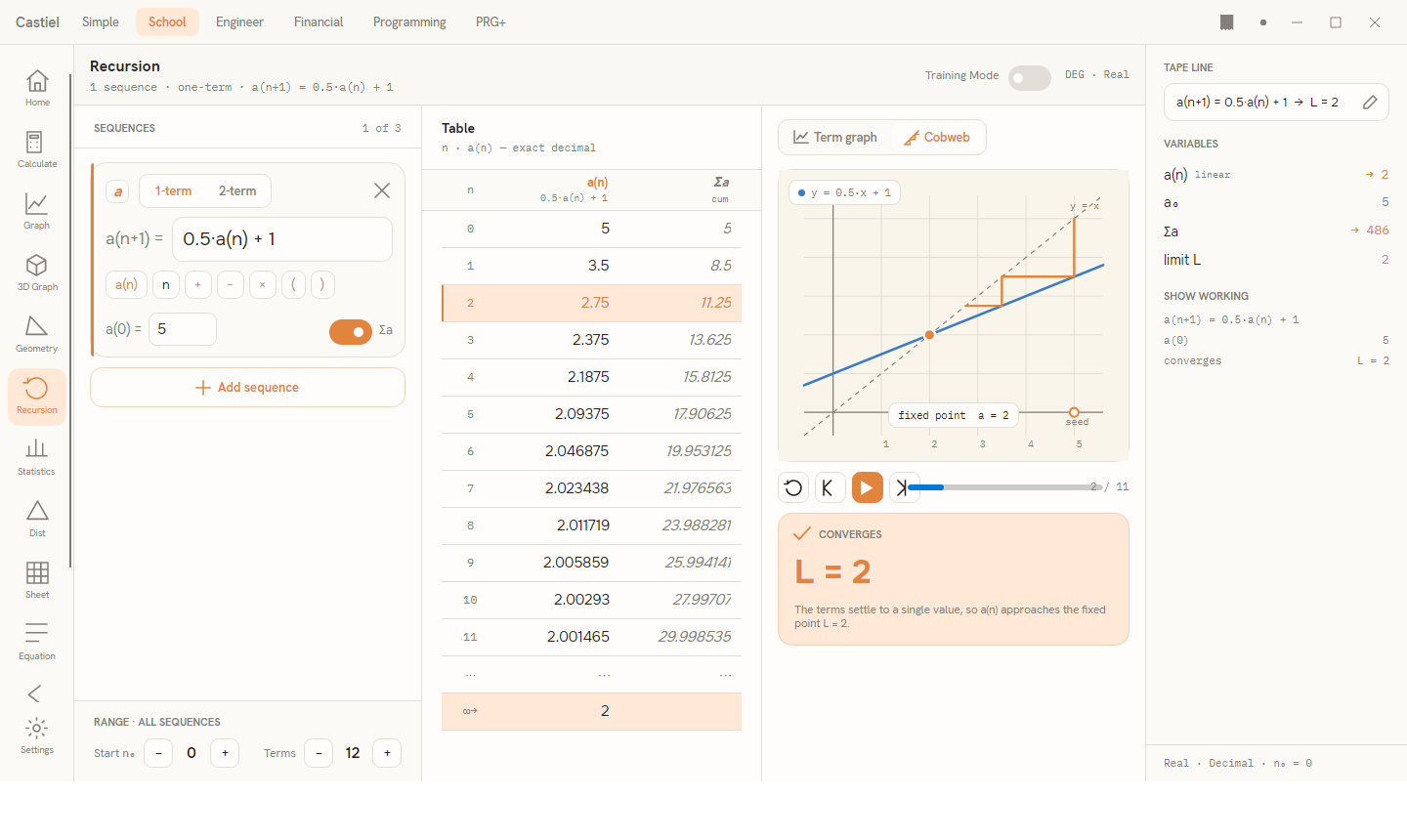
The window has four working areas. On the left is the Sequences spine, where you define your recurrence and its seed value, and set the range of terms. In the centre is the Table column (which becomes the Worked substitutions panel in Training Mode). On the right of the workspace is the Visual column, with the term graph or cobweb diagram and the convergence verdict. A Training Mode switch sits in the header strip at the top. Furthest right is the shared panel carrying the tape line, the variables, and the show-working excerpt.
Defining a recurrence
Each sequence lives in a slot in the Sequences spine. A slot has three parts you fill in:
The order picker: 1-term or 2-term. At the top of the slot, a small two-way picker chooses how far back the rule reaches:
- 1-term - each term depends on the single term before it. The rule is written
a(n+1) = …, and you supply one starting value,a(0). - 2-term - each term depends on the two terms before it (Fibonacci-style). The rule is written
a(n+2) = …, and you supply two starting values,a(0)anda(1).
The rule. To the right of the dim a(n+1) = (or a(n+2) =) prefix is an editable field where you type the right-hand side - the formula for the next term. You write it in the sequence's own terms: a(n) is the previous term, a(n+1) the one before that in a two-term rule, and n is the current index. A row of token chips below the field inserts these pieces for you - a(n), n, and the operators +, −, ×, (, ) - so you can build the rule by tapping rather than typing. Multiplication is written with the centre dot, as in 0.5·a(n).
The seed value(s). At the bottom of the slot is the starting term, labelled a(0) = (the label follows the start index - if you move the range to start at n = 1, it reads a(1) =). A two-term rule shows a second seed field beside it. These are the ground the whole sequence is built on: change a seed and every later term is recomputed.
Beside the seeds is a Σ toggle (labelled Σa). Turn it on to add a running-sum column to the table - each row then also shows the cumulative total of every term up to that point.
A worked setup. The app opens with a converging example already defined: a(n+1) = 0.5·a(n) + 1, with a(0) = 5. Read it as "the next term is half of the current term, plus one." Every time you edit the rule, a seed, or the range, the table, graph, and verdict recompute at once. If the rule cannot be understood, a short message appears in red beneath the field and the outputs pause until you fix it.
More than one sequence. Press Add sequence to define a second or third recurrence (up to three). They are colour-coded a, b, c and can reference one another - the token palette of each slot gains chips for the others, so a rule like b(n+1) = a(n) + b(n) is possible. The Range footer at the bottom of the spine sets two things shared by all sequences: the Start n₀ (the index of the first term) and the number of Terms to generate.
The Table tab
The centre column, headed Table, lists the sequence term by term. The first column is n, the index; then one value column per sequence, headed a(n) with the rule echoed beneath it. If a sequence's Σ toggle is on, its running-sum column (Σa, marked cum) sits immediately to the right of its values.
Read the table straight down: row n = 0 is your seed, row n = 1 is the first computed term, and so on. Selecting a row highlights it and cross-marks the matching point on the graph or the matching step on the cobweb in the Visual column, so you can connect a number to its position on the picture.
When a sequence converges, the table closes with two special rows: a ⋯ row standing for the terms you did not ask to see, and an ∞→ limit row showing the value the sequence is heading toward. That limit row appears only for a single converging sequence - it is the app telling you where the terms end up without you having to scroll for hundreds of steps.
Running sums in practice. Turn on Σ for the opening example and the sum column shows 5, then 5 + 3.5 = 8.5, then 8.5 + 2.75 = 11.25, and so on. Because the terms themselves shrink toward a limit, the running sum climbs and then eases off - a concrete picture of a series adding up.
The Visual tab
The Visual column on the right draws the sequence. A segmented toggle at the top chooses between two views:
Term graph. Each term is plotted as a point at its index n, with the points joined so you can see the shape: a level approach, a runaway climb, or a saw-toothed bounce. With several sequences defined, each is drawn in its own colour with a legend. This view is always available.
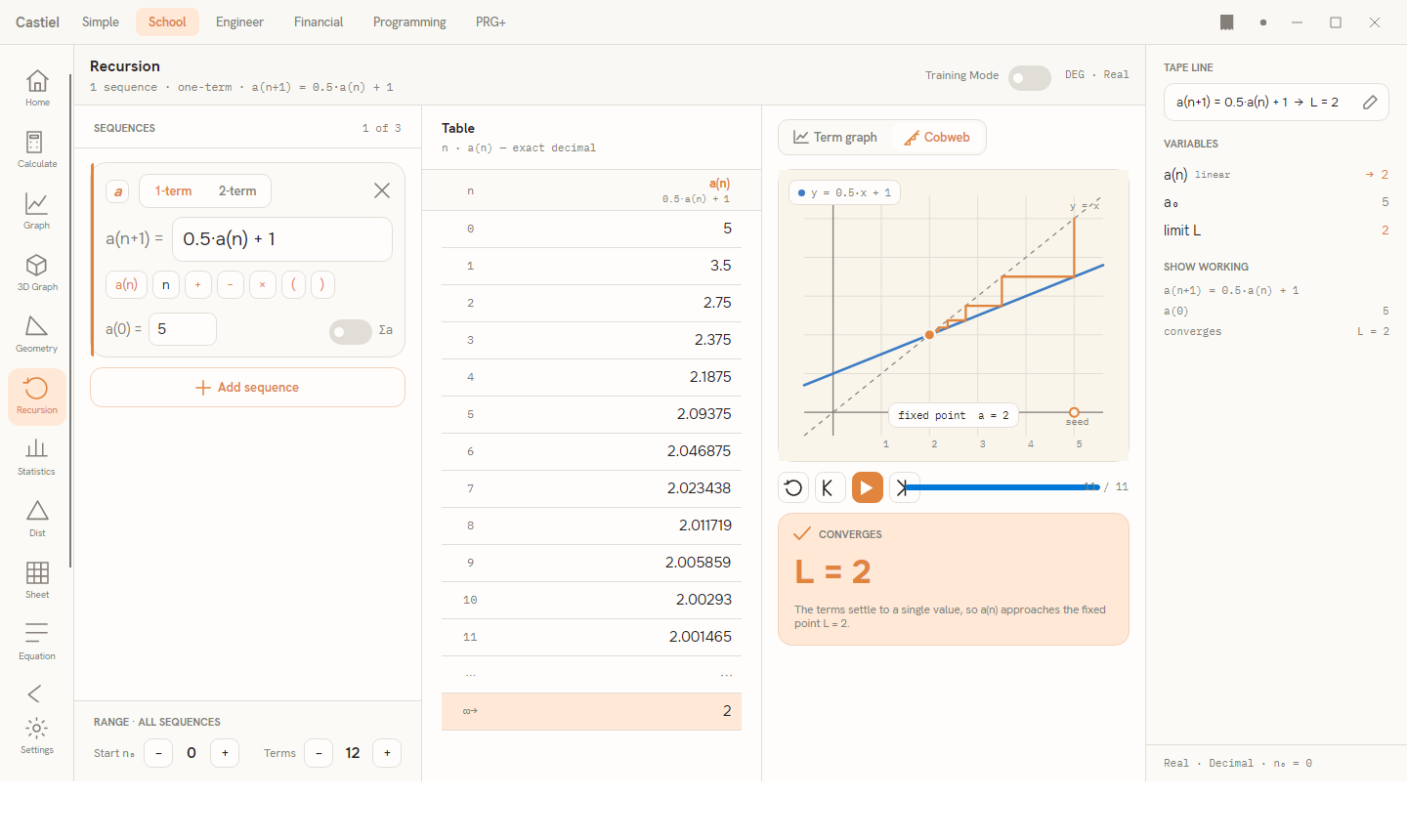
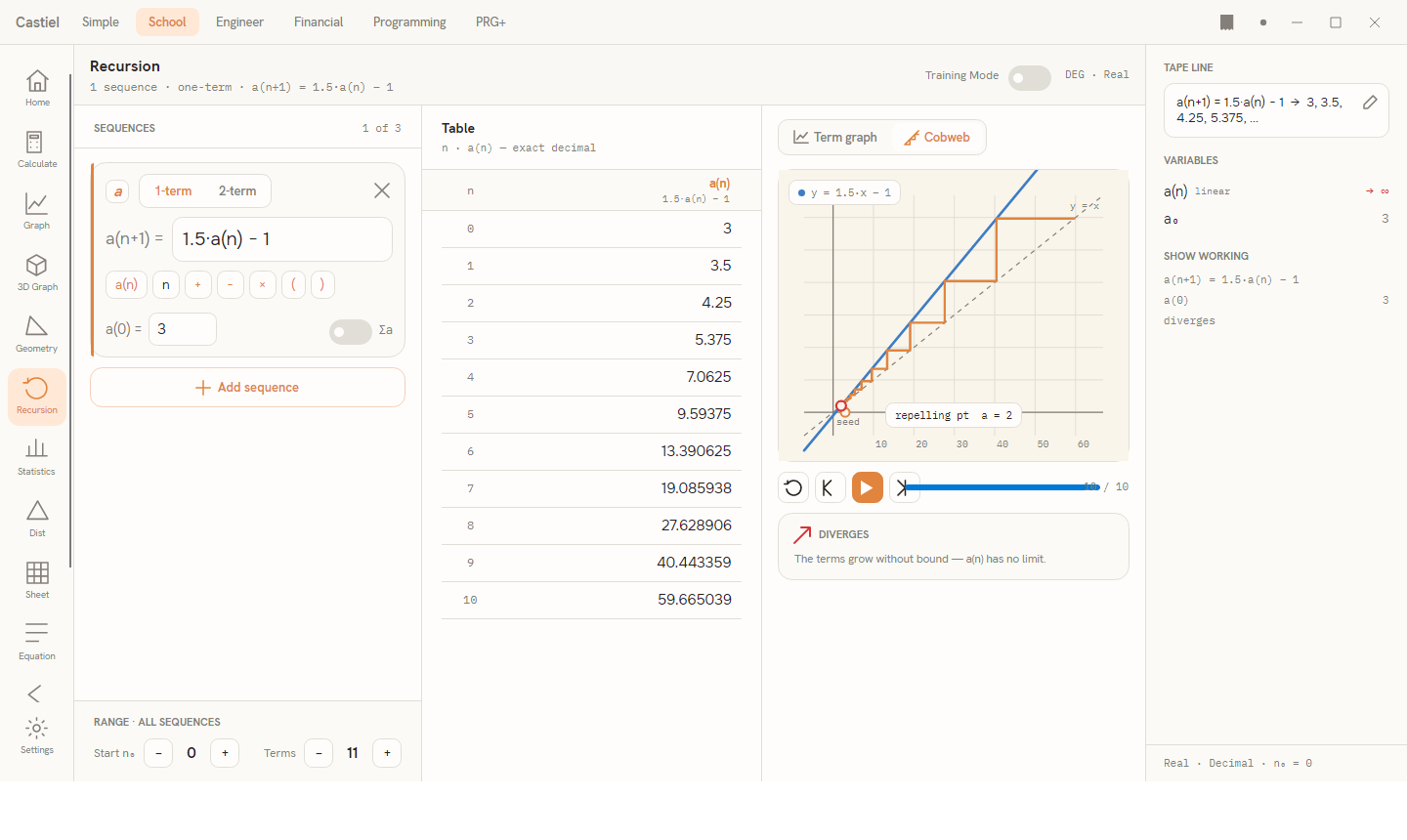
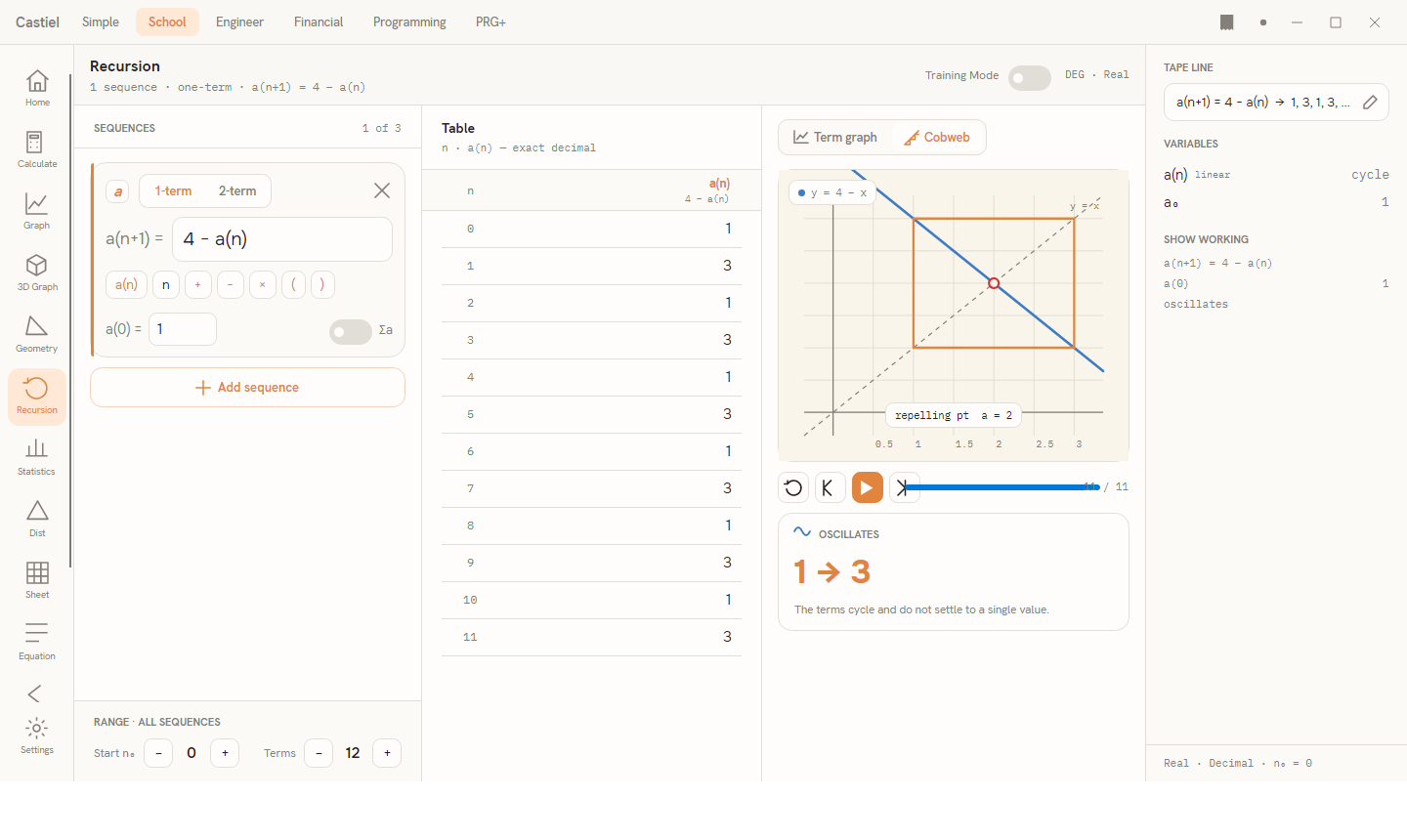
Cobweb. For a single one-term sequence, the cobweb (or staircase) diagram is the classic tool for seeing why a sequence behaves as it does. It plots the rule as a curve y = f(x) together with the diagonal line y = x, then traces the "staircase" the sequence walks: up to the curve, across to the diagonal, up to the curve again. Where the curve crosses the diagonal is a fixed point - a value the rule leaves unchanged. If the staircase spirals into that crossing, the sequence converges to it (an attracting fixed point); if it steps away, the point is repelling and the sequence does not settle. A caption on the diagram names the fixed point and its value. The cobweb needs a single one-term sequence: for a two-term rule, or when several sequences are overlaid, the toggle disables and a short note explains that the term graph is shown instead.
Animate and step. Below the cobweb is a transport bar. Press play to animate the staircase building one iteration at a time; the step-forward and step-back buttons advance or rewind a single iteration, and restart returns to the seed. A progress read-out shows how far through the run you are (for example 6 / 11). Stepping through the staircase is the surest way to watch a sequence close in on its limit - or fail to.
The convergence verdict
Beneath the diagram, a verdict card classifies how the sequence behaves in the long run. It shows one of three headings, each with a short explanation:
| Verdict | What it means |
|---|---|
CONVERGES |
The terms settle toward a single value. The card shows that value as L = …; it is the limit the sequence approaches. |
DIVERGES |
The terms grow without bound. There is no limit - the sequence runs off to infinity. |
OSCILLATES |
The terms neither settle nor run away; they cycle or bounce. When a clean repeating cycle is detected, the card shows it (for example 1 → 3). |
The verdict is drawn from a long internal run, not just the handful of terms on screen, so it is a reliable read on the sequence's fate even when the visible table looks undecided. The right-hand panel echoes the same result: each sequence's variable row shows → L for a limit, → ∞ for divergence, or cycle for oscillation.
Training Mode
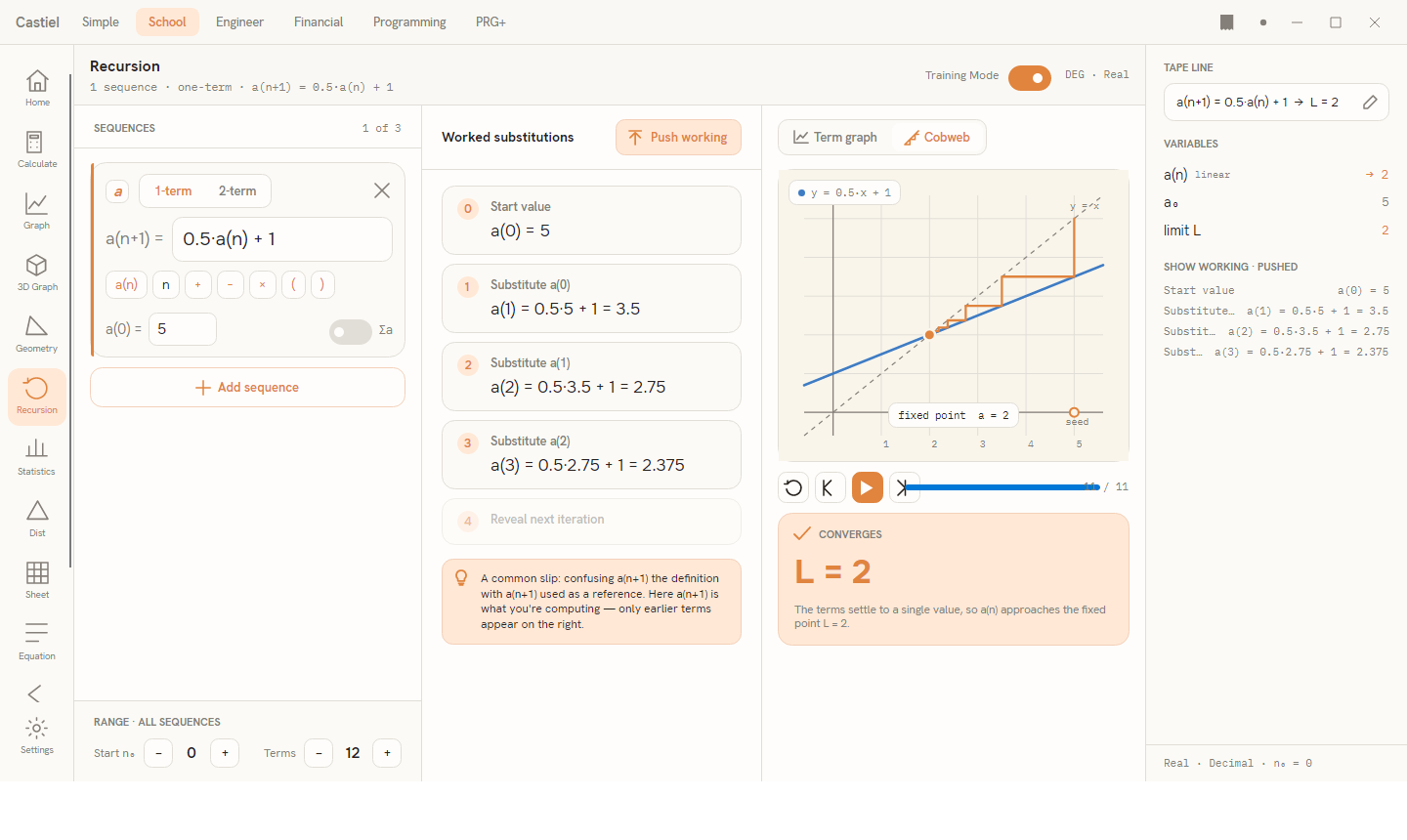
Flip the Training Mode switch in the header and the centre column changes from the finished table to Worked substitutions - the sequence derived one line at a time, the way you would show your working on paper. For the one-term example it reads:
- Start value -
a(0) = 5. - Substitute a(0) -
a(1) = 0.5·5 + 1 = 3.5. - Substitute a(1) -
a(2) = 0.5·3.5 + 1 = 2.75. - Substitute a(2) -
a(3) = 0.5·2.75 + 1 = 2.375.
Each step shows the rule with the previous term substituted in, then the arithmetic, then the result - so you see exactly where each number comes from. A dashed "Reveal next iteration" line sits at the end, and a hint below the steps points out the common slip for the case at hand (for a two-term rule, that you need two seeds before the rule can start; for a one-term rule, not to confuse the term you are computing with the terms you are using).
Push to Tape. The Push working button in the column header sends the whole derivation to the shared paper tape, through the show-working panel on the right (its heading then reads SHOW WORKING · PUSHED). This keeps a permanent, reviewable record of the steps - useful for a written answer or for comparing two attempts. For everything the tape can do with those steps, see the paper tape.
Two-term recurrences
A two-term recurrence looks back two steps, so it needs two starting terms. Switch a slot's order picker to 2-term and the prefix becomes a(n+2) = and a second seed field, a(1) =, appears.
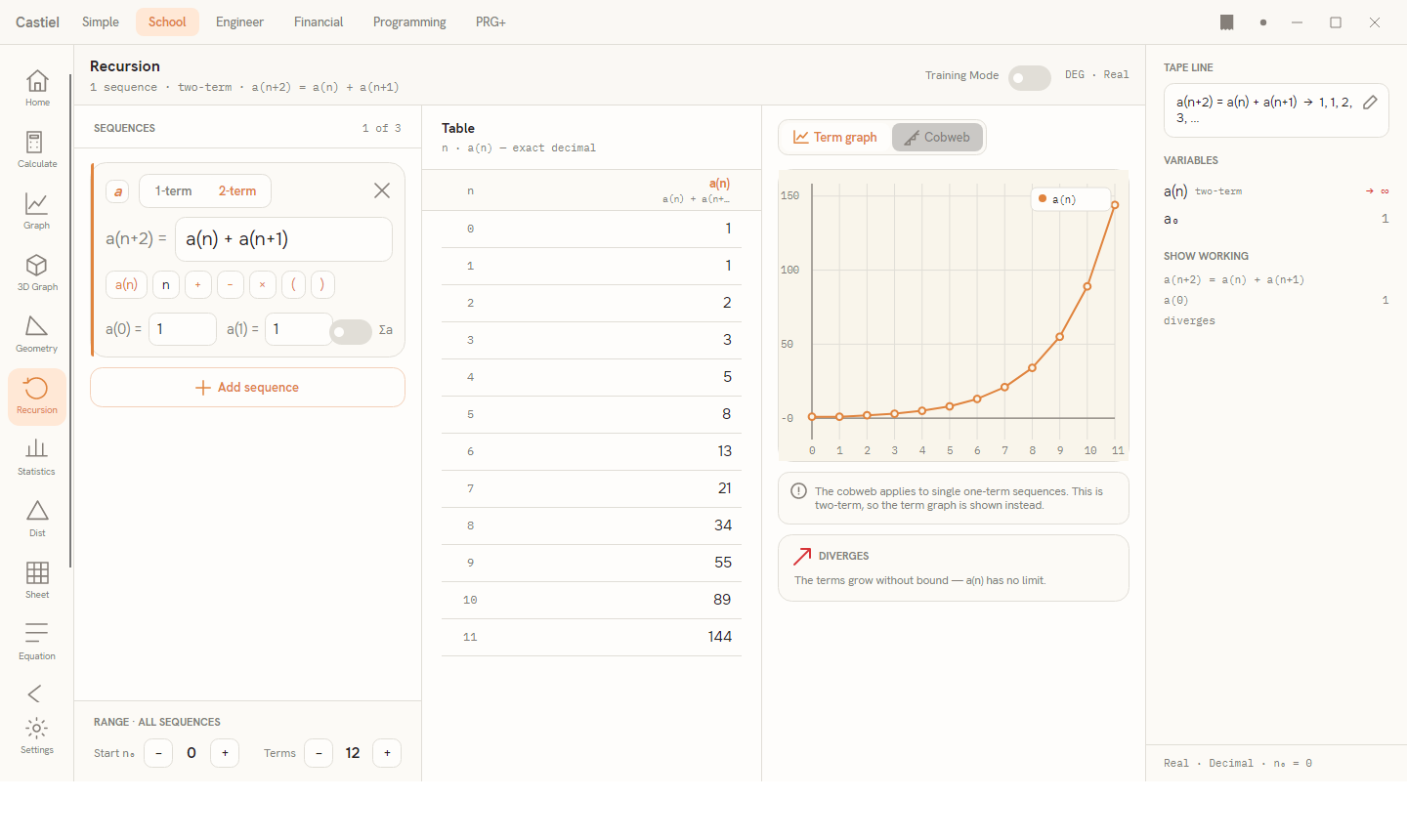
Worked example - the Fibonacci numbers. In the empty-state you can tap the Fibonacci example chip, or build it by hand:
- Set the slot to 2-term.
- Type the rule
a(n) + a(n+1)- each term is the sum of the two before it. - Set both seeds to
1:a(0) = 1anda(1) = 1.
The table then reads 1, 1, 2, 3, 5, 8, 13, 21, … - the Fibonacci sequence. Because the terms grow without bound, the verdict is DIVERGES, and the Visual column shows the term graph (the cobweb does not apply to two-term rules). Training Mode shows both seeds on the first line, then the first computed term with both earlier terms substituted in.
A sequence that oscillates
Not every recurrence settles or runs away. Consider a(n+1) = 3.2·a(n)·(1 − a(n)) with a seed such as a(0) = 0.4. The terms do not approach one value and do not grow without bound - they fall into a repeating bounce between two levels. The app reports OSCILLATES, and where the bounce is a clean short cycle it names it (for example, alternating between two values). On the cobweb, the staircase settles into a closed rectangle around the fixed point rather than spiralling into it - the visual signature of a sequence that never lands.
The lesson these examples share is the one the verdict makes explicit: a recurrence has a long-run character that the first few terms rarely reveal. Define the rule, read the table for the numbers, watch the cobweb for the reason, and trust the verdict for the outcome.
Related chapters
- The School calculator - the everyday scientific workspace, and where most School work begins.
- Graph - plotting ordinary functions of
x, as opposed to sequences inn. - The School apps - the full set of tiles on the rail.
- Catena sequences and functions - authoring reusable sequences you can call from any mode.
- The paper tape - where pushed working is kept, edited, and exported.