Chapters
Complex numbers
Some equations have no answer among the ordinary numbers. Ask "what number, multiplied by itself, gives −4?" and the everyday number line has nothing to offer: any real number squared is zero or positive, never negative. Complex numbers are the extension of arithmetic that fills this gap. They turn "no solution" into a solution, and they are the natural language for anything that rotates or oscillates - alternating current, waves, signal processing, control systems. This chapter builds the idea from the ground up, then shows exactly how to work with complex numbers on the Castiel calculator.
If complex numbers are new to you, read the first four sections in order. If you already know the theory and just want the keys, jump to Computing complex numbers in Castiel.
Why i exists
The whole subject rests on a single invented quantity. Mathematicians define the imaginary unit i as the number whose square is −1:
i² = −1
There is no real number with this property, so i is something genuinely new - but once you allow it, every square root of a negative number becomes writable. The square root of −4, for example, is 2i, because (2i)² = 4 × i² = 4 × (−1) = −4. Nothing about i is approximate or a trick; it obeys all the usual rules of algebra, with the one extra rule that any i² you meet can be replaced by −1.
The name "imaginary" is a historical accident and slightly unfortunate - these numbers are no less real, in the everyday sense, than negative numbers once were. They are simply a second dimension of number, at right angles to the familiar one.
The parts of a complex number
A complex number combines an ordinary (real) number with an imaginary one. Its standard form is:
a + bi
ais the real part - an ordinary number.bis the imaginary part - also an ordinary number, but it counts multiples ofi.
So 3 + 4i has real part 3 and imaginary part 4. A plain real number like 7 is just the special case 7 + 0i, and a pure imaginary like 2i is 0 + 2i. Every real number you have ever used is already a complex number with a zero imaginary part; complex numbers do not replace the reals, they contain them.
You add and multiply them by treating i as an algebraic symbol and collecting terms. Adding (3 + 4i) and (1 + 2i) gives 4 + 6i - real parts with real parts, imaginary with imaginary. Multiplication uses i² = −1 to fold the stray term back into the real part.
The complex plane
Because a complex number carries two independent numbers, one picture holds it perfectly: a plane, not a line. Draw a horizontal axis for the real part and a vertical axis for the imaginary part. Then a + bi is simply the point (a, b). This picture is called the complex plane (or Argand diagram), and it is the key to everything that follows.
- Real numbers live along the horizontal axis.
- Pure imaginary numbers live along the vertical axis.
3 + 4isits three units right and four units up.
Seeing a complex number as a point - or as an arrow from the origin to that point - is what makes the next idea, polar form, feel natural.
Rectangular and polar form
There are two equally valid ways to name a point on the complex plane, and complex arithmetic uses both.
Rectangular form is the a + bi you have already met: it names the point by how far across and how far up it is. It is the form you usually type.
Polar form names the same point by how far it is from the origin and in which direction. Two quantities describe this:
- The magnitude (also called the modulus or absolute value), written
|z|, is the straight-line distance from the origin to the point. By Pythagoras, forz = a + biit is√(a² + b²). The magnitude is always a plain non-negative number. - The argument, written
arg(z), is the angle the arrow makes with the positive real axis, measured anticlockwise. It is an angle, so it is reported in whatever angle unit is active - degrees or radians.
For 3 + 4i the magnitude is √(9 + 16) = √25 = 5, and the argument is the angle whose tangent is 4/3, about 53.13°. The same number is 3 + 4i in rectangular form and "magnitude 5 at 53.13°" in polar form. Polar form is what makes multiplication and rotation easy: multiplying two complex numbers multiplies their magnitudes and adds their arguments.
Computing complex numbers in Castiel
Complex numbers are an Engineer-mode feature. In everyday School mode the calculator stays on the real number line, so asking for √(−4) there is reported as an error - the correct answer for a strictly real calculator. Switch to the Engineer calculator to work with complex results.
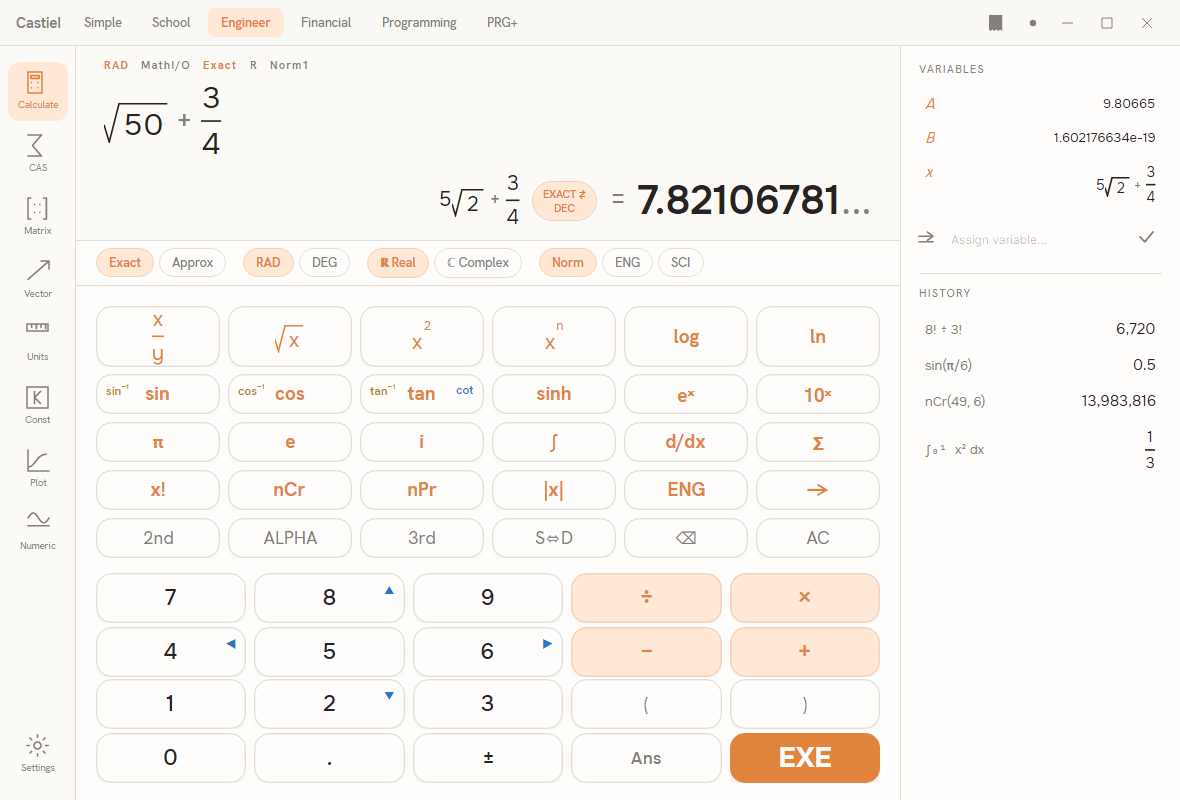
The Real / Complex chip. Across the top of the Engineer calculator is a row of mode chips: Exact | Approx, then RAD | DEG, then the ℝ Real | ℂ Complex pair, then Norm | ENG | SCI. The ℝ Real / ℂ Complex pair is the switch that matters here:
- With
ℝ Realactive, the calculator refuses to produce a complex answer from real input.√(−4)is reported as an error, because no real number squares to −4. This is the default. - With
ℂ Complexactive, the same√(−4)returns2i. Operations that would have errored now return their complex value.
Tap the ℂ Complex chip once to switch; the chip lights to show it is active, and every following calculation may return a complex result.
The i key. The Engineer keypad has a dedicated i key (the imaginary unit) in the scientific block, alongside π and e. To enter 3 + 4i, press 3, +, 4, then the i key. You type complex numbers in rectangular form exactly as they are written.
Exact versus decimal. As in every mode, the S⇔D key (and the EXACT⇄DEC pill beside the result) flips the displayed answer between an exact form and a plain decimal, without changing the value.
A note on the angle mode. The argument of a complex number is an angle, so arg and the polar conversions report it in the active angle unit shown on the RAD | DEG chips. The same complex number has argument 53.13 in DEG and about 0.927 in RAD. Check the chip before reading an angle, just as you would for trigonometry.
The complex operations
Castiel provides a small, focused set of complex-number functions. Each takes exactly one complex value. The magnitude also has a dedicated |x| key on the Engineer keypad; the rest you type by name into the entry line.
| Name | What it returns | Typed form | Arguments |
|---|---|---|---|
| Real part | the a in a + bi |
re(z) |
1 |
| Imaginary part | the b in a + bi |
im(z) |
1 |
| Conjugate | flips the sign of the imaginary part, a − bi |
conj(z) |
1 |
| Magnitude | distance from the origin, √(a² + b²) |
mag(z), or the ` |
x |
| Argument | the angle to the positive real axis | arg(z) |
1 |
| To polar | re-express a rectangular value in polar form | to_polar(z) |
1 |
| To rectangular | re-express a polar value in rectangular form | to_rect(z) |
1 |
A few points worth knowing:
- The conjugate
conj(3 + 4i)is3 − 4i- the mirror image across the real axis. It is central to dividing complex numbers and always has the same magnitude as the original. - The argument uses the principal value: it lands in the half-open range from just above −180° to +180° (in radians, from just above −π to π), so each direction has one agreed angle. The argument of
0is undefined - the origin has no direction - and the calculator reports that as an error. to_polarandto_rectre-express the same number in the other form; they change how it is presented, not its value.- The elementary and trigonometric functions -
√,exp,log, powers,sin,cos,tan, and their hyperbolic and inverse partners - all accept a complex input inℂ Complexmode and return a complex result, following the standard (principal-branch) conventions.
Worked examples in Castiel
Example 1 - the square root of a negative (√(−4)). On a strictly real calculator this has no answer; in complex mode it does.
- Open the Engineer calculator. Tap the
ℂ Complexchip so it is active. - Press the
√xkey to drop in a root template, type−4(use the±key for the minus, or type4then negate), and pressEXE. - The result is
2i. That is the number whose square is −4:(2i)² = 4i² = −4. - Now tap
ℝ Realand evaluate√(−4)again. This time the calculator reports an error, because in real mode −4 has no square root. Neither answer is a fault - each is exactly what its mode promises.
Example 2 - magnitude and argument of 3 + 4i. This takes a complex number apart into its polar description.
- Confirm the
ℂ Complexchip is active, and glance at theRAD | DEGchips - setDEGso the angle comes back in degrees. - For the magnitude, press the
|x|key, then type3 + 4i(press3,+,4,i), close the bracket, and pressEXE. The result is5- the point(3, 4)is five units from the origin, the 3-4-5 triangle. - For the argument, type
arg(3 + 4i)and pressEXE. InDEGthe result is about53.13; the arrow to3 + 4irises about 53 degrees above the real axis. - Switch the chip to
RADand evaluatearg(3 + 4i)again: the same angle now reads about0.927radians. PressS⇔Dto move between exact and decimal forms where an exact one exists.
Together, magnitude 5 and argument 53.13° are the polar form of 3 + 4i. You can get both at once with to_polar(3 + 4i), and return to rectangular form with to_rect.
The habit to keep is the same one that governs trigonometry: check the mode chips first. ℝ Real versus ℂ Complex decides whether a complex answer is even allowed, and RAD versus DEG decides the units of every angle you read back.
See also
- The Engineer calculator - the surface used in the examples above, and its full mode-chip row.
- Trigonometry - the angle functions behind a complex number's argument.
- Vectors - the other two-component quantity, and how magnitude and direction work there.