Chapters
Units and quantities
Most numbers in the real world are not bare numbers. A recipe calls for 200 g of flour, a road sign reads 90 km/h, an oven is set to 180 °C. Each is a quantity: a number joined to a unit, where the unit says what the number counts. This chapter explains what a quantity is, why units have to match before you can add or compare them, how to convert between units within the same family, and how you can write quantities directly inside a sequence and have the calculator check them for you.
If you only want to convert one unit to another right now, jump to Converting units: the Engineer converter. If you want to understand why a calculation can be refused for a "unit mismatch," read on from the top.
What a quantity is
A quantity is a number with a unit attached: 5 kg, 3 metres, 90 km/h. The number on its own - 5, 3, 90 - is only half the story. Five what? The unit answers that. Change the unit and you change the meaning entirely: 5 kg and 5 g are both "five of something," but one is a thousand times heavier than the other.
Because the unit is part of the value, the calculator carries it along through your working. When you compute with quantities, the answer comes back with a unit too. Multiply a 5 m length by another 5 m length and the result is 25 m² - an area, not a plain 25. The unit is not decoration; it records what kind of thing the number measures, and the calculator uses it to keep your arithmetic meaningful.
Dimension is the deeper idea. Behind every unit is a dimension - the kind of quantity it measures. Metres, feet, miles, and light-years are all different units of the same dimension: length. Grams, pounds, and tonnes are all units of mass. Seconds, minutes, and hours are all time. Two quantities are compatible when they share a dimension, even if their units differ. 1 km and 500 m are compatible (both length); 5 kg and 30 s are not (mass versus time). This distinction is what makes the next section work.
Why units must match
You can only add or compare quantities of the same dimension. This rule is not the calculator being fussy - it reflects what the arithmetic means. Adding 1 km to 500 m is sensible: they are both lengths, so their total is a length. Adding 5 kg to 30 s is not: there is no such thing as "5 kilogram-seconds" as a sum, because mass and time are different kinds of thing. The old saying is that you cannot add apples to oranges, and dimensions are how a calculator tells apples from oranges.
Checking that dimensions line up before combining quantities is called dimensional analysis. Castiel does it automatically:
- Adding or subtracting compatible quantities works, and the calculator converts one to match the other first.
1 km + 500 mgives1.5 km: the500 mis converted to0.5 kmand the result takes the unit of the left-hand value. Likewise5 kg + 200 ggives5.2 kg. - Adding or subtracting incompatible quantities is refused.
5 kg + 30 sproduces an error, not a number, because mass and time have no common dimension. The calculator reports a unit mismatch and names the two dimensions that clash, so you can see what went wrong rather than getting a silently wrong answer. - Comparing follows the same rule.
1 km = 1000 mistrue, and5 kg < 5001 gistrue, because the calculator converts to a shared unit before comparing. But5 kg < 5 sis a mismatch error - there is no way to line mass up against time.
This is a safety net. A dimension mismatch almost always means a real mistake in the expression - the wrong variable, a dropped conversion, a unit typed wrong. Catching it as an error is far more useful than returning a number that happens to be arithmetically tidy but physically meaningless.
Dimensions can also cancel. When you divide a quantity by another of the same dimension, the units cancel completely and you are left with a plain number. 10 m / 2 m is 5 - a dimensionless ratio, with no unit at all. This is exactly why trigonometric ratios like sine are plain numbers: they are one length divided by another (see Trigonometry).
Compound units
Not every unit is a single word. Many describe a relationship between dimensions, built by multiplying or dividing simpler units:
- Speed is distance divided by time:
km/h(kilometres per hour),m/s(metres per second). The slash is read "per." - Area is length times length:
m²(square metres),ft²(square feet). The small²means the unit is used twice. - Volume is length cubed:
m³,cm³. - Density is mass divided by volume:
kg/m³.
These are compound units, and the calculator builds and tracks them for you as a natural consequence of the arithmetic. Divide a distance by a time and you get a speed: 90 km ÷ 1 h gives 90 km/h. Multiply a length by a length and you get an area: (5 m)² gives 25 m². You never have to tell the calculator "this is a speed" - the unit follows from what you divided by what, and it stays attached to the result for any further calculation.
Temperature is a special case
Most conversions are pure scaling: to turn kilometres into metres you multiply by 1000, and zero of one is zero of the other. Temperature scales are different, because their zero points do not line up. Zero Celsius is not "no temperature" - it is the freezing point of water, which is 273.15 K on the Kelvin scale and 32 °F on the Fahrenheit scale. Converting between them therefore needs an offset as well as a scale factor; these are called offset scales or affine scales.
Castiel handles this for you. Converting a single reading applies the full offset formula:
25 °Cconverts to298.15 K(add 273.15).32 °Fconverts to0 °C(the freezing point again).
There is one subtlety worth knowing. A temperature can mean a reading on the scale (25 °C, a point) or a change in temperature (5 °C warmer, a difference). When you add a temperature to another, the calculator treats the second value as a difference: 25 °C + 5 K gives 30 °C, because five kelvin of warming added to a twenty-five-degree reading is thirty degrees - the offset is not applied twice. This matches how every scientific calculator handles temperature, and it is why you can freely mix °C and K in a running heat calculation without the numbers going strange.
Converting units: the Engineer converter
For everyday conversions there is a dedicated tool. In Engineer mode, open the Units surface to reach the unit converter. Pick a category, type a value on the From side, choose the two units, and the To side updates as you type. It is the quickest way to answer "how many centimetres is six inches?" without writing an expression.
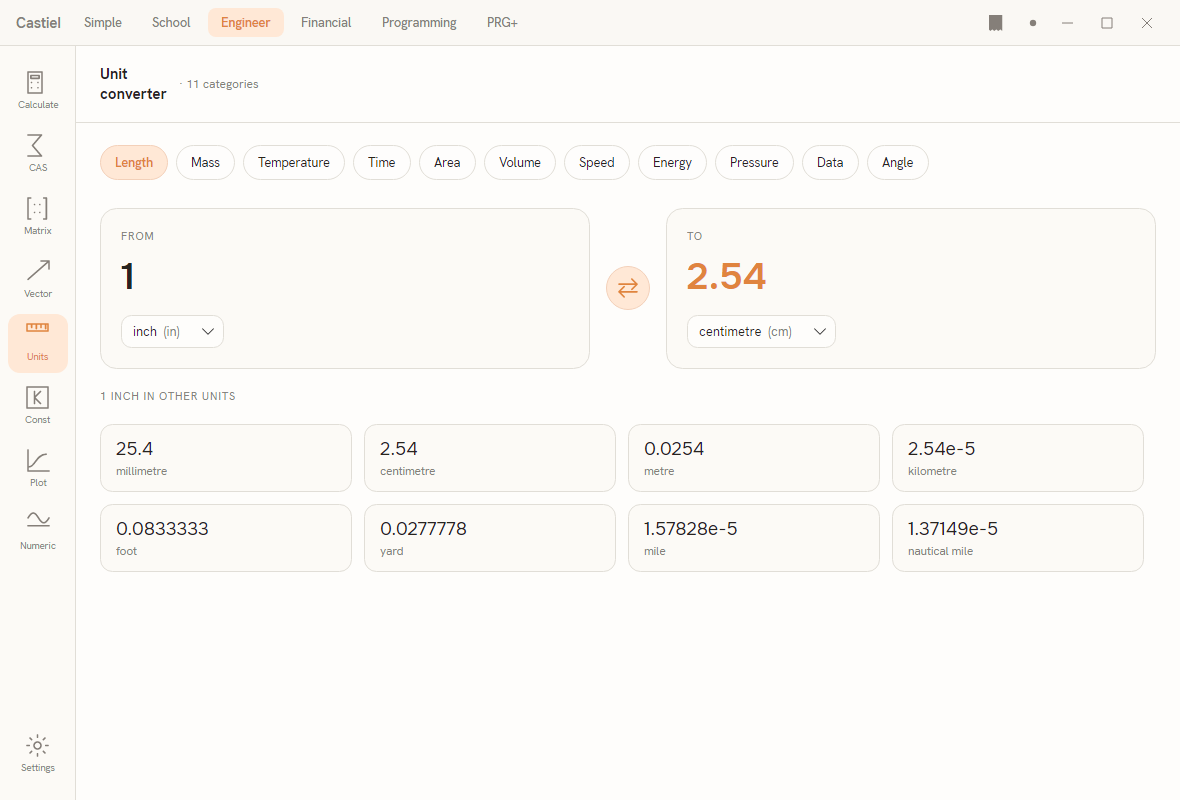
The layout. A header names the tool and notes the number of categories. Below it, a row of category chips lets you choose the family of units; the active chip is highlighted. Under that sit two cards - From on the left, To on the right - with a round swap button between them that exchanges the two units in one click. At the bottom, a common-units grid shows your From value expressed in every other unit in the category at once, so a single length shows up simultaneously in millimetres, feet, yards, miles, and the rest.
The categories. The converter covers eleven unit families. Choose one with the category chips:
| Category | What it measures | Sample units |
|---|---|---|
| Length | distance | mm, cm, m, km, in, ft, yd, mile, n mile |
| Mass | how much matter | mg, g, kg, mton (tonne), oz, lb, ton(short), ton(long) |
| Temperature | hotness (offset scales) | K, °C, °F, °R |
| Time | duration | ms, s, min, h, day, week, yr |
| Area | surface | cm², m², ha, km², in², ft², acre, mile² |
| Volume | capacity | mL, L, m³, in³, ft³, gal(US), gal(UK), pt |
| Speed | distance per time | m/s, km/h, mile/h, ft/s, knot |
| Energy | work or heat | J, cal_th, kcal_th, kW·h, Btu, erg, eV |
| Pressure | force per area | Pa, kPa, bar, atm, mmHg, inHg, lbf/in² (psi) |
| Data | digital storage | B, KB, MB, GB, TB, KiB, MiB, GiB |
| Angle | rotation | deg, grad, mrad, arcmin, arcsec, turn |
Every conversion runs through the same engine that powers the rest of the calculator, so the converter and a typed expression always agree.
For the Engineer Units surface in full - including the constants library that sits alongside the converter - see Engineer: units and constants.
Quantities inside a sequence
You are not limited to the converter. When you write a sequence, you can put a quantity straight into the text: a number, a space, then a unit. 5 kg, 90 km/h, and 9.81 m/s² are all valid values you can name, store, and compute with, exactly like plain numbers.
The space matters: write 90 km/h, not 90km/h. The gap tells the calculator where the number ends and the unit begins.
Because these are real quantities, the same dimensional checking applies inside a sequence. If you add two lengths, you get a length; if you try to add a length to a mass, the sequence reports the mismatch instead of running. Writing your working with units, rather than stripping them off and trusting yourself to remember what each number meant, lets the calculator catch a whole class of mistakes for you. The full rules for writing quantity literals, and how results are formatted, are in Catena types and formatting.
Worked examples
Example 1 - convert a length. How many centimetres is six inches?
- Switch to Engineer mode and open the Units surface.
- Select the Length category chip (it is the one the converter opens on).
- Set the From unit to
in(inch) and the To unit tocm(centimetre). - Type
6in the From card.
The To card reads about 15.24. Six inches is 15.24 cm. Glance at the common-units grid and you will also see the same length shown in millimetres, feet, and the rest at once. Press the swap button and the converter now turns centimetres into inches instead.
Example 2 - a mismatch is rejected. Suppose, in a sequence, you try to total a weight and a wait time: 5 kg + 30 s.
The calculator does not return a number. It reports a unit mismatch, telling you the two quantities have different dimensions - one is a mass, the other a time - so they cannot be added. This is the safety net working: the expression is meaningless, and rather than inventing an answer, the calculator flags it so you can fix the mistake. Change it to two compatible quantities - say 5 kg + 30 g - and it evaluates cleanly to 5.03 kg, converting the grams to kilograms and returning the result in the left-hand unit.
The pattern behind both examples is the same. A quantity carries its unit everywhere it goes; the calculator converts freely within a dimension and refuses across dimensions. Let it check your units, and it will catch the errors you would otherwise only find much later.
See also
- Engineer: units and constants - the full Engineer Units surface and the constants library beside the converter.
- Catena types and formatting - writing quantity literals in a sequence and formatting results.
- Angles and coordinates - the Angle category and converting between degrees, radians, and gradians.
- Trigonometry - why ratios of lengths come out as plain, unit-free numbers.