Chapters
Arithmetic and order of operations
Arithmetic is the oldest mathematics: adding, subtracting, multiplying, and dividing numbers. It looks simple, and for a single operation it is. The part that trips people - and calculators - is what happens when several operations sit in one expression. Does 2 + 3 × 4 mean "add two and three, then multiply by four" (which gives 20) or "multiply three by four, then add two" (which gives 14)? Only one of those is correct, and this chapter explains why, then shows how to enter such expressions in Castiel so you always get the answer you intend.
If you are comfortable with the four operations and just want the keys and the rounding functions, jump to Doing arithmetic in Castiel.
The four operations
Everyday arithmetic is built from four operations, each with its own symbol on the keypad:
- Addition (
+) combines two numbers into their total:7 + 5 = 12. - Subtraction (
−) takes one number away from another:7 − 5 = 2. - Multiplication (
×) is repeated addition:7 × 5is five sevens added,35. - Division (
÷) splits a number into equal parts:12 ÷ 4 = 3.
Two of these come in matched pairs that undo each other. Subtraction undoes addition; division undoes multiplication. That pairing is why they share a rank in the order of operations below: multiply and divide belong together, add and subtract belong together.
Division carries one rule the others do not: you cannot divide by zero. There is no number that 6 ÷ 0 could sensibly equal, so Castiel reports an error rather than inventing an answer. Every other combination of the four operations is defined for any two numbers.
Order of operations
When an expression mixes operations, mathematicians follow one agreed order so that everyone reads it the same way. The order, from first to last:
- Parentheses - anything inside brackets is worked out first.
- Powers and roots - exponents and radicals next. (These have their own chapter, Powers and roots.)
- Multiplication and division - worked left to right, sharing one rank.
- Addition and subtraction - worked last, also left to right, sharing one rank.
You may have learned this as BODMAS, BIDMAS, or PEMDAS - different names for the same sequence. The key idea is that multiplication and division outrank addition and subtraction. That single rule settles the puzzle from the top of the chapter.
Why 2 + 3 × 4 is 14, not 20. Multiplication ranks above addition, so the 3 × 4 is done first:
2 + 3 × 4
2 + 12       (multiply first: 3 × 4 = 12)
14           (then add: 2 + 12 = 14)
Reading strictly left to right - adding the 2 and 3 before multiplying - would give 5 × 4 = 20, which is wrong. The calculator does not simply process keys in the order you press them; it reads the whole expression and applies the ranking. Type 2 + 3 × 4 and press EXE and Castiel returns 14.
When left-to-right matters. Within a single rank, work runs left to right. So 20 ÷ 4 × 5 is (20 ÷ 4) × 5 = 25, not 20 ÷ (4 × 5) = 1. The same applies to a run of subtractions: 10 − 3 − 2 is 5, not 9.
Grouping with parentheses. To force a different order, wrap the part you want done first in parentheses. Because parentheses rank first of all, they override everything else:
2 + 3 × 4is14.(2 + 3) × 4is20- the brackets make the addition happen before the multiplication.
Parentheses can nest. The innermost pair is resolved first, then the next pair out, and so on. When you are unsure how an expression will be read, adding parentheses is never wrong: they make your intent explicit and cost nothing.
Negative numbers and the sign key
A minus sign does two different jobs, and it helps to keep them apart.
- As an operator,
−sits between two numbers and subtracts:7 − 5. - As a sign, a minus marks a single number as negative:
−5on its own is a value five below zero.
On the keypad the subtraction operator is the − key. To make a number negative - to give it a sign rather than subtract it from something - use the ± key, which flips the sign of the number you are currently entering. Press 5 then ± and the entry becomes −5. Press ± again to flip it back to positive.
The ordinary rules of signs apply: subtracting a negative is the same as adding (7 − (−3) = 10), and multiplying two negatives gives a positive ((−4) × (−2) = 8). When a negative number is the input to a function or is raised to a power, wrap it in parentheses so its sign is unmistakable: (−3)² is 9, whereas −3² reads as "the negative of 3²", which is −9.
Exact versus decimal results
Some divisions come out even; many do not. 12 ÷ 4 is exactly 3, but 1 ÷ 3 is 0.33333... - a decimal that never ends. Castiel prefers to keep such a result in its exact form, as the fraction 1/3, rather than round it off. The exact form is the primary answer, shown as the headline.
The decimal is always one keypress away. Press the S<->D key to toggle the displayed result between the exact form and its decimal approximation: 1/3 becomes 0.33333333... and back again. The toggle changes only how the answer is shown; the stored value is untouched. Reach for the decimal when you want a plain figure to read off, and keep the exact form when you will carry the result into further calculation, because it loses no precision. This behaviour is covered in full in The School calculator.
Doing arithmetic in Castiel
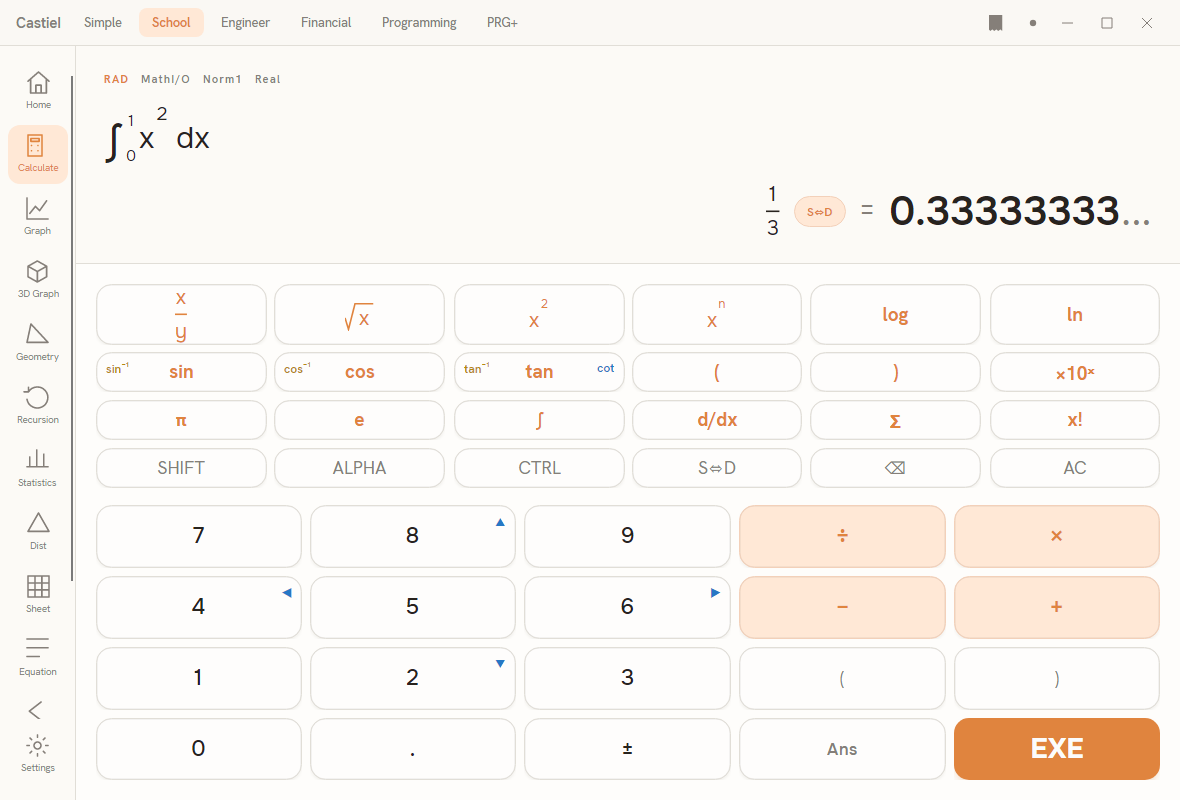
The examples below use the School calculator, reached from the Calculate tile on the apps rail, but arithmetic works the same wherever these keys appear.
The keys. The number block carries the digits 0–9, the decimal point ., the four operators ÷ × − +, the sign key ±, a pair of parentheses ( ) for grouping, Ans to reuse the previous answer, and EXE to evaluate. Type an expression left to right the way you would write it, using ( and ) where you need to force an order, and press EXE. Castiel applies the ranking described above - you do not have to press the keys in calculation order.
Chaining with Ans. After any result, the Ans key inserts that previous answer into a new expression, so you can build on it. Compute 50 ÷ 8, then type Ans × 8 and press EXE to return to 50 exactly, with no rounding in between.
Rounding and related functions. Sometimes you want to shape a number deliberately - round it to whole pounds, strip its decimals, take its size regardless of sign. These functions have no dedicated keys; type the name followed by its argument in parentheses, for example round(3.14159, 2). The active number format (Norm, Fix, Sci) changes only how a decimal is displayed; these functions change the value itself.
| Function | What it does | Typed form | Arguments |
|---|---|---|---|
round |
Rounds to the nearest whole number, or to a given number of decimal places | round(x) or round(x, places) |
1 or 2 |
floor |
Rounds down to the whole number at or below x - floor(2.9) = 2, floor(−2.1) = −3 |
floor(x) |
1 |
ceil |
Rounds up to the whole number at or above x - ceil(2.1) = 3, ceil(−2.9) = −2 |
ceil(x) |
1 |
trunc |
Cuts off the decimal part, moving toward zero - trunc(2.9) = 2, trunc(−2.9) = −2 |
trunc(x) |
1 |
frac |
Keeps only the fractional part - frac(3.7) = 0.7, frac(−3.7) = −0.7 |
frac(x) |
1 |
abs |
The absolute value: the size of a number, dropping any sign - abs(−5) = 5 |
abs(x) |
1 |
sign |
Reports the sign as −1, 0, or 1 - negative, zero, or positive |
sign(x) |
1 |
mod |
The remainder after dividing x by y - mod(17, 5) = 2 |
mod(x, y) |
2 |
min |
The smallest of the values given | min(a, b, ...) |
1 or more |
max |
The largest of the values given | max(a, b, ...) |
1 or more |
clamp |
Holds x within a range: below lo it returns lo, above hi it returns hi |
clamp(x, lo, hi) |
3 |
A few points worth keeping straight. floor and trunc agree on positive numbers but differ on negatives: floor always goes down (floor(−2.5) = −3) while trunc always heads toward zero (trunc(−2.5) = −2). round with no second argument rounds to a whole number; give it a second number to choose the decimal places, as in round(3.14159, 2) = 3.14. mod gives the remainder, so it is the tool for questions like "is this number even?" (mod(n, 2) is 0 when it is) or "what is the time 17 hours after 9 o'clock?" (mod(9 + 17, 12)).
Worked examples in Castiel
Example 1 - order of operations with a bill. Three friends buy four coffees at £2 each plus a £3 pastry to share, and split the total. What does each pay? The total is 4 × 2 + 3, and each share is that divided by 3.
- Type
(4×2+3)÷3. The brackets force the whole bill to be worked out before the split. - Press
EXE. Inside the brackets, multiplication outranks addition, so4 × 2 = 8happens first, then+ 3gives11; dividing by3gives the exact fraction11/3. - Press
S<->Dto read it as a decimal: about3.6667. Each friend pays roughly £3.67.
Note what the brackets bought you. Without them, 4 × 2 + 3 ÷ 3 would apply the ranking across the whole line - 8 + 1 = 9 - which is not the bill at all.
Example 2 - rounding a measurement. A plank measured 2.7 metres must be cut into whole-metre lengths, and you want to know how much offcut is left. The number of whole metres is trunc(2.7); the leftover is frac(2.7).
- Type
trunc(2.7)and pressEXE. The result is2- two whole metres. - Type
frac(2.7)and pressEXE. The result is0.7- the leftover is 0.7 metres. - To round the original length to one decimal place instead, type
round(2.7, 1); here that is already2.7, butround(2.74, 1)would give2.7andround(2.75, 1)would give2.8.
Both examples turn on the same discipline: decide the order you want, use parentheses to lock it in, and pick the rounding function that matches the question - down, up, toward zero, or nearest.
See also
- The School calculator - the surface used in the examples, and the
S<->Dexact/decimal toggle in full. - Powers and roots - the exponents and radicals that rank just below parentheses.
- Number theory - factors, primes,
gcd,lcm, and the integer side ofmod.