Chapters
Engineer units and constants
Engineer mode ships two reference workspaces that sit alongside its calculator: a unit converter for turning a quantity from one unit into another, and a physical constants library for looking up and inserting standard scientific values. You reach them from the left rail in Engineer mode - the Units tile opens the converter, the Const tile opens the constants library. Both are read-and-reach tools: you look something up, then carry it into your working. Switch to Engineer from the mode bar along the top (Simple, School, Engineer, Financial, Programming, PRG+), then pick the tile you need on the rail (Calculate, CAS, Matrix, Vector, Units, Const, Plot, Numeric).
For the calculator itself, see Engineer calculator. For the theory behind units and dimensional consistency, see Units and quantities.
Converting units
The unit converter turns a value expressed in one unit into the same physical quantity expressed in another - 1 inch into 2.54 centimetres, 60 miles per hour into kilometres per hour, 100 kilopascals into pounds per square inch. The header reads Unit converter · 11 categories: the converter is organised into eleven families of unit, and you convert within one family at a time.
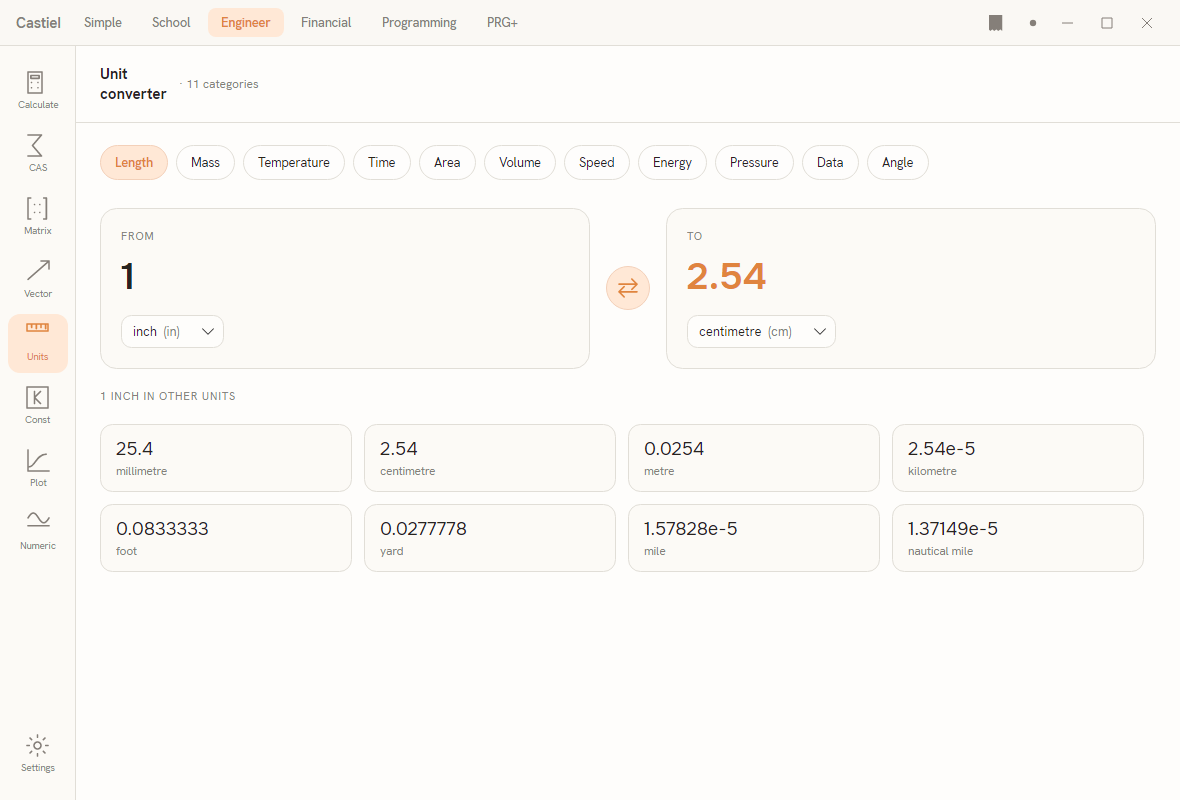
The category row. Along the top is a row of chips, one per family. The eleven categories are:
| Category | Covers | Example units |
|---|---|---|
Length |
distances | millimetre, centimetre, metre, kilometre, inch, foot, yard, mile, nautical mile |
Mass |
weight / mass | milligram, gram, kilogram, tonne, ounce, pound, short ton, long ton |
Temperature |
temperature scales | kelvin, celsius, fahrenheit, rankine |
Time |
durations | millisecond, second, minute, hour, day, week, year |
Area |
surface area | square centimetre, square metre, hectare, square kilometre, square inch, square foot, acre, square mile |
Volume |
capacity | millilitre, litre, cubic metre, cubic inch, cubic foot, US gallon, UK gallon, pint |
Speed |
velocity | metre/second, kilometre/hour, mile/hour, foot/second, knot |
Energy |
energy / work | joule, calorie, kilocalorie, kilowatt-hour, BTU, erg, electronvolt |
Pressure |
pressure | pascal, kilopascal, bar, atmosphere, mmHg, inHg, psi |
Data |
digital storage | byte, kilobyte, megabyte, gigabyte, terabyte, kibibyte, mebibyte, gibibyte |
Angle |
plane angle | degree, gradian, milliradian, arcminute, arcsecond, turn |
The active chip is highlighted in the accent colour. Click any chip to switch families; the unit pickers below refill with that family's units.
The converter cards. Below the chips are two cards with a round swap button between them:
- The FROM card holds an editable value at the top and a unit dropdown below it. Type the quantity you have into the value, and choose its unit from the dropdown. Each dropdown entry shows the full name with its symbol in brackets -
inch (in),centimetre (cm). - The TO card shows the converted result in the accent colour, with its own unit dropdown. This value is read-only: it updates the instant you change the input value or either unit.
- The swap button (the round arrows between the cards) exchanges the two units, so From becomes To and back. It carries the converted amount across, so the swap keeps showing the same physical quantity from the other direction.
Dimensional checking. Because you only ever pick units from one category at a time, the two sides always describe the same kind of quantity - you cannot ask the converter for "metres in kilograms". A conversion that the engine cannot carry out (for example, a value the field cannot read as a number) shows a dash — in the To card rather than a misleading figure.
The common-units grid. Under the converter is a grid captioned like 1 INCH IN OTHER UNITS. It expands your From value into every other unit of the active category at once, each cell showing the value over its unit name. It is a quick reference: enter your quantity once and read it in millimetres, metres, feet, yards, and the rest without touching the dropdowns. Very large or very small results appear in scientific form (for example 2.54e-5 kilometres).
Worked example - miles to kilometres. How far is a 10-mile run in kilometres?
- Click the
Lengthchip. - In the FROM card, type
10and set the unit dropdown tomile (mile). - Set the TO unit dropdown to
kilometre (km). - Read the result: about
16.09in the TO card. The 10-mile run is roughly 16.1 km.
Glance at the common-units grid below and you will also see the same 10 miles rendered in metres, yards, feet, and nautical miles.
Carrying a converted value into a calculation. The converter is a lookup surface: it shows the result for you to read, not a live term in an expression. To use a converted figure in a calculation, note the value in the TO card and type it into the Engineer calculator on the Calculate tile; committed calculations there flow to the paper tape. The converter itself does not write to the tape.
Physical constants
The constants library is a searchable catalog of standard scientific values - the speed of light, the Planck constant, Avogadro's number, and the rest. The header reads Physical constants · CODATA 2022: the physical values come from the 2022 CODATA recommended set, the internationally agreed reference figures. The catalog holds 51 physical constants plus 6 mathematical ones.
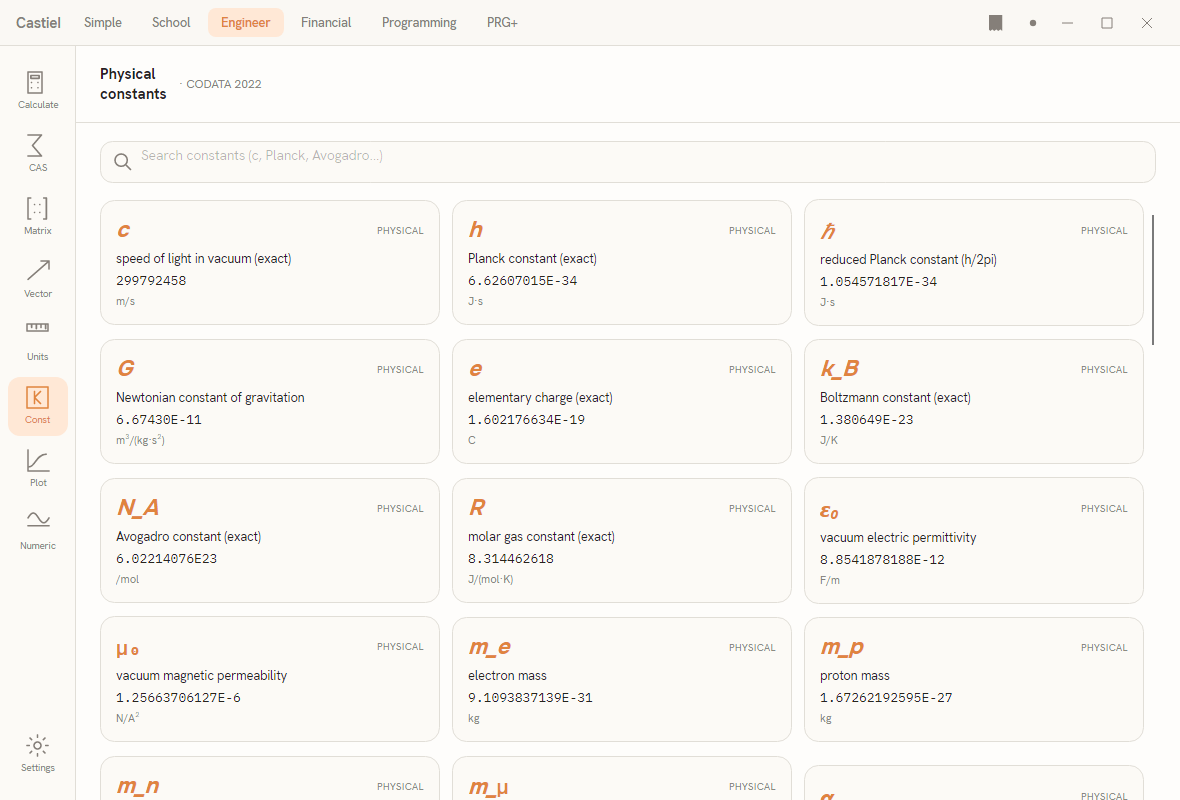
Browsing and searching. The constants are laid out as a scrolling three-column grid of cards; scroll to browse the whole set. The search bar across the top filters as you type - matching against a constant's symbol, its name, and its description - so c, Planck, or Avogadro all narrow the grid to what you are after. Clear the search box to bring the full catalog back.
What a card shows. Each card carries, from top to bottom:
- the symbol, in italic accent type -
c,h,ℏ,G,N_A,k_B,ε₀; - a category tag in the top corner:
PHYSICALfor a measured or defined physical constant,MATHEMATICALfor a pure-number constant; - the name / description - for example "speed of light in vacuum (exact)" or "Newtonian constant of gravitation";
- the value, in its documented form (
299792458for the speed of light,6.62607015E-34for the Planck constant - scientific notation where the magnitude calls for it); - the unit, where the constant has one (
m/s,J·s,C). Pure mathematical constants show no unit.
Inserting a constant. Click a card to drop that constant into the calculator: the value is inserted into the Calculate input, ready to use in an expression. You do not have to memorise or retype the digits - pick the card and the constant is in your working. Inserting takes you to the Calculate surface with the constant in place.
Worked example - using the speed of light. How far does light travel in one minute?
- Open the constants library from the Const tile.
- Type
c(orspeed) into the search bar; the speed-of-light card rises to the top, showing299792458m/s. - Click the card. The constant is inserted into the Calculate input.
- On the Calculate surface, complete the expression - multiply by 60 seconds - and evaluate. The result, about
1.8 × 10¹⁰metres, is the distance light covers in a minute, and it commits to the paper tape like any other calculation.
Because the inserted value is the full-precision constant, calculations built from it stay as accurate as the catalog figure - no rounding creeps in from copying digits by hand.
Related chapters
- Engineer calculator - the Calculate surface that converted values and inserted constants flow into.
- Units and quantities - the theory of units, dimensions, and why conversions stay within a family.
- The paper tape - where committed calculations are logged, edited, and exported.