Chapters
The Bond worksheet
The Bond worksheet prices a coupon bond and finds its yield. Give it the settlement and maturity dates, the coupon rate, and the redemption value, then supply either a yield and solve for the price, or a price and solve for the yield. It is the counterpart to the TVM worksheet for instruments that pay a fixed coupon and redeem at a set date, and it follows the day-count and coupon-frequency conventions of a professional financial calculator.
You reach it from Financial mode. Switch the chrome to Worksheets and pick Bond from the worksheet strip along the top (TVM · Cash Flow · Amortization · Bond · Depreciation · Breakeven · Profit Margin · Interest Conv). The Bond tab opens with the same two-part layout every worksheet uses: a form on the left and a result card on the right.
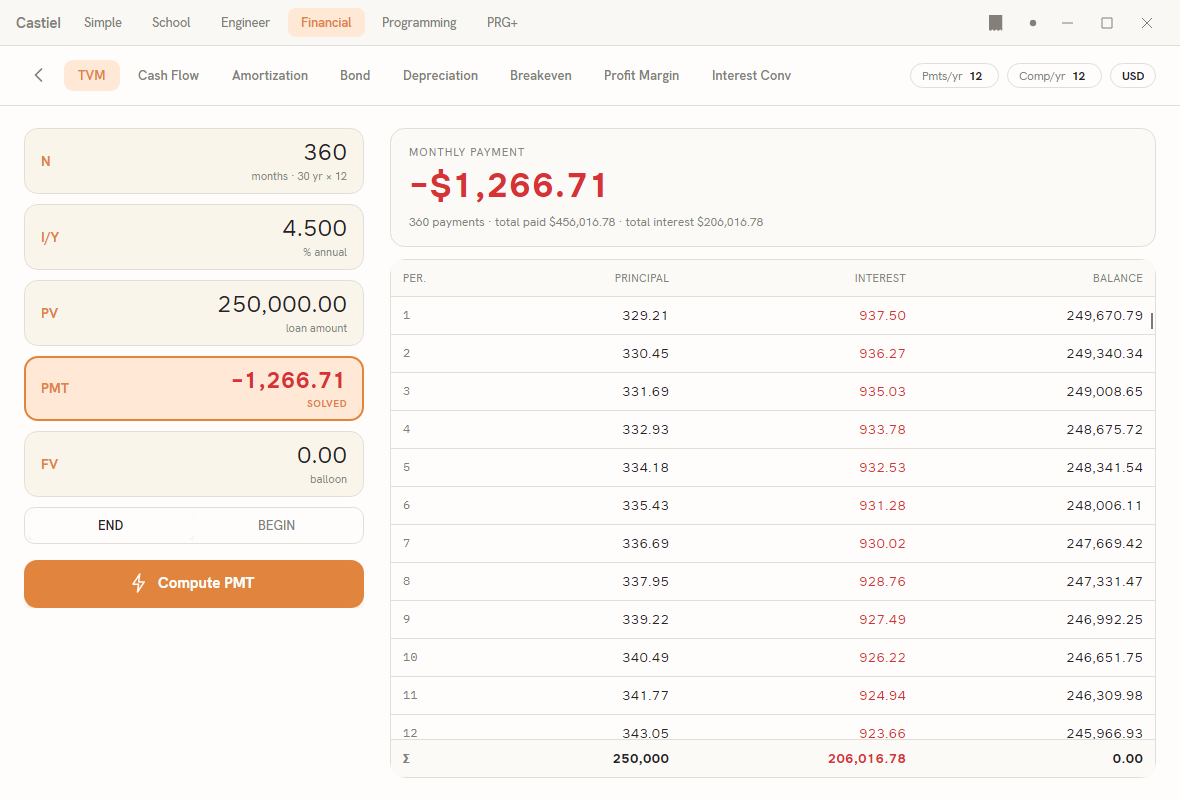
The screenshot above shows the worksheets view with the TVM tab active; the Bond tab sits three places to its right in the same strip, and Bond shares this exact left-form / right-result-card design. The form is a stack of labelled fields - a short key on the left (SDT, RDT, CPN, and so on), the value you type on the right, and a faint unit hint beneath each value. Below the fields sit two toggle pairs, a day-count menu, and the Compute button. When you compute, the answer appears in the large result card on the right.
The bond inputs
Each field carries a three-letter key in the BA II style and a hint line telling you what to enter.
| Key | Field | What to enter |
|---|---|---|
SDT |
Settlement date | The date you settle the trade, as yyyy-mm-dd (for example 2025-01-01). |
RDT |
Maturity / redemption date | The date the bond redeems, as yyyy-mm-dd. |
CPN |
Coupon rate | The annual coupon rate as a percentage (for example 10.000 for a 10% coupon). |
YLD |
Yield | The annual yield to redemption, as a percentage. Input when solving for price; result when solving for yield. |
PRI |
Price | The price per 100 of par. Result when solving for price; input when solving for yield. |
RV |
Redemption value | The redemption amount per 100 of par. Defaults to 100.00 - par redemption. |
Dates. Both dates are entered in ISO form, yyyy-mm-dd. If you type a date any other way, the worksheet reports Settlement: enter a date as yyyy-mm-dd (or the matching maturity message) instead of computing. The maturity field doubles as the redemption date - the coupon runs up to it and the bond redeems on it.
Coupon and redemption as percentages of par. The worksheet works in the "per 100 of par" convention used by bond desks. The coupon rate and the redemption value are both quoted against a par of 100, and the price the worksheet returns is likewise per 100. A bond that redeems at par leaves RV at its default of 100.00; enter a different figure only for a bond that redeems at a premium or discount to par.
Yield or price - one is the input, the other is the answer. YLD and PRI are two ends of the same relationship. You fill in one and let the worksheet compute the other; which one you type is set by the solve-direction toggle described below. The field being solved is flagged with a small SOLVED tag once you compute, and its value is written back into the form so you can read it in place as well as on the result card.
Coupon frequency and day-count convention
Two settings control how the coupon accrues between dates. Both matter to the answer, so set them before you compute.
Coupon frequency. A pair of toggle buttons chooses how often the coupon is paid:
ANNUAL- one coupon per year.SEMIANNUAL- two coupons per year. This is the default and the common convention for most government and corporate bonds.
Day count. The Day count menu chooses the convention used to count the days between coupon dates and up to settlement - the basis for discounting and for accrued interest. Four conventions are offered:
| Convention | How days are counted |
|---|---|
ACT/ACT |
Actual days elapsed over the actual days in the period. The default. |
30/360 |
Every month treated as 30 days, every year as 360. |
ACT/360 |
Actual days elapsed over a 360-day year. |
ACT/365 |
Actual days elapsed over a 365-day year. |
ACT/ACT is the default selection. These four are the complete set the worksheet supports; there is no other basis to choose from.
Computing price from yield, and yield from price
The solve-direction toggle at the bottom of the form decides which quantity is the unknown:
SOLVE PRICE- you supply the yield inYLD; the worksheet computes thePRIvalue. This is the default direction.SOLVE YIELD- you supply the price inPRI; the worksheet computes theYLDvalue.
Set the direction, fill every field the direction needs, then press Compute. The result card on the right fills in:
- When solving for price, the card is headed PRICE PER 100 and shows the price as its headline figure.
- When solving for yield, the card is headed YIELD TO REDEMPTION and shows the yield as a percentage.
Beneath the headline, a meta line restates the settings that produced it - the coupon frequency, the day-count convention, and the accrued interest per 100 of par. Accrued interest is the slice of the next coupon that has built up between the last coupon date and settlement; a buyer pays it on top of the quoted price. When settlement falls exactly on a coupon date, no interest has accrued yet and the figure is zero.
If a required field is empty or malformed, the worksheet shows a short message in red instead of a result - for example Enter the price (per 100) to solve the yield when you switch to SOLVE YIELD without a price, or Enter the yield (% annual) to solve the price in the other direction. Fix the flagged field and press Compute again.
Worked example: pricing a semiannual bond at a given yield
Price a five-year bond that carries a 10% coupon paid twice a year, redeems at par, and is quoted to yield 6%. These are the worksheet's opening values, so you can follow along on a freshly opened Bond tab.
- Confirm the fields read:
SDT2025-01-01,RDT2030-01-01,CPN10.000,YLD6.000,RV100.00. - Confirm the frequency toggle is on
SEMIANNUALand the Day count menu showsACT/ACT- both are the defaults. - Confirm the solve direction is
SOLVE PRICE(the default). - Press Compute.
The result card is headed PRICE PER 100 and shows the price 117.06. The PRI field in the form fills with the same figure and picks up its SOLVED tag. The meta line beneath the headline reads semiannual · ACT/ACT followed by the accrued interest per 100 - here 0.00, because settlement lands on a coupon anniversary. The bond is worth 117.06 per 100 of par: because its 10% coupon comfortably beats the 6% required yield, it trades at a premium to its par redemption.
Turn it around. To check the yield from that price, switch the toggle to SOLVE YIELD, leave PRI at 117.06, and press Compute. The card now reads YIELD TO REDEMPTION 6.000 % - the yield you started from, recovered from the price.
Related chapters
- The Financial calculator - Financial mode, the worksheet strip, and the shared conventions.
- The TVM worksheet - time value of money, the sister worksheet for loans, savings, and annuities.