Chapters
Time value of money
The Time Value of Money worksheet is the heart of Financial mode. It answers the question every loan, savings plan, and investment comes down to: money you have today is worth more than the same amount later, because today's money can earn interest. TVM ties five quantities together, and once you know any four of them, the worksheet solves for the fifth. A monthly mortgage payment, the future value of a regular savings plan, the interest rate hidden in a lease, the number of payments left on a loan - all of them are one TVM solve.
You reach the worksheet from the Financial calculator by switching the workspace from Calculator to Worksheets; TVM is the first tab and opens by default. It is the surface used for straight annuity and lump-sum problems. For a period-by-period repayment breakdown of a loan you have set up here, move to the Amortization tab; to translate between nominal and effective rates, use Interest conversion.
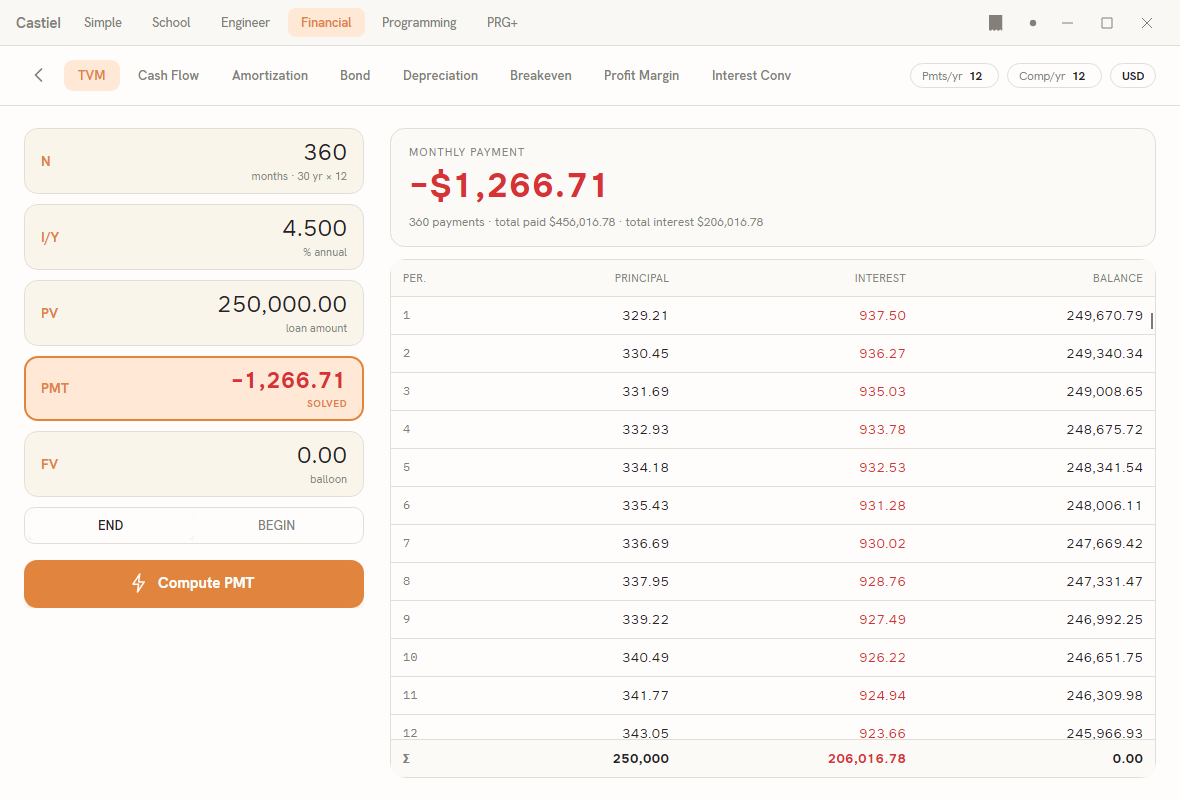
The window has a header band and a two-column body. The header carries a back chevron (which returns you to the calculator keypad), the tab bar (TVM, Cash Flow, Amortization, Bond, Depreciation, Breakeven, Profit Margin, Interest Conv), and, at the top right, three settings chips: Pmts/yr, Comp/yr, and the currency tag (for example USD). The left column of the body is the input form: the five value fields, the END/BEGIN switch, and the Compute button. The right column shows the result once you solve, with the live amortization schedule beneath it.
The five variables
Every TVM problem is described by these five registers. Each appears as a field with its short label on the left, the editable value on the right, and a one-line reminder of what it means underneath.
| Field | Meaning | Legend shown |
|---|---|---|
N |
The total number of payment periods - not years, periods. A 30-year loan paid monthly has N = 360. |
months, and where the count divides evenly, 30 yr × 12 |
I/Y |
The annual interest rate, entered as a percent. Enter 4.5 for four and a half percent, not 0.045. |
% annual |
PV |
Present value: the lump sum at the start - a loan amount received, or an opening balance. | loan amount |
PMT |
Payment made each period. | per period |
FV |
Future value: the lump sum at the end - a final balance, or a balloon payment. | balloon |
N is shown as a plain count, I/Y to three decimal places (4.500), and the three money fields to two decimal places with your chosen digit grouping (250,000.00).
The sign convention. This is the single rule that trips people up, so it is worth stating plainly: money coming toward you is positive; money leaving you is negative. PV, PMT, and FV all follow it.
- Borrowing money, the loan lands in your account, so
PVis positive and the repayments you make are negativePMT. - Saving money, each deposit leaves your pocket, so
PMTis negative and the balance you collect at the end is a positiveFV.
If you enter every cash flow with the same sign, the worksheet cannot balance the equation and the answer will look wrong (often a huge or negative number where you expected a modest one). When a value is negative it is drawn in the negative accent colour so you can see the direction of each cash flow at a glance. N and I/Y are always entered positive.
Payments and compounding per year
Two settings in the header decide how the annual rate is applied and how often a payment falls:
Pmts/yr(P/Y) - how many payments there are in a year. Monthly is12, quarterly4, annual1. This also sets the length of one period, so it governs whatNcounts.Comp/yr(C/Y) - how many times a year interest compounds.
Both default to 12. Editing Pmts/yr copies the same number into Comp/yr automatically (the usual case, where payments and compounding line up); if your problem compounds on a different cycle than it pays, set Comp/yr afterwards to split them. The I/Y you enter is an annual figure - Castiel converts it to the correct per-period rate using both P/Y and C/Y, so you never work out a monthly rate by hand.
Begin or end of period
Directly under the fields is a two-way switch, END / BEGIN, that sets when in each period the payment falls:
END(the default) is an ordinary annuity: the payment is made at the end of each period. Loans, mortgages, and most instalment plans work this way.BEGINis an annuity due: the payment is made at the start of each period. Leases and rent-in-advance arrangements work this way.
The choice shifts every payment by one period's worth of interest, so it changes the answer. If a computed payment or balance is slightly off from a figure you are checking against, confirm this switch matches the arrangement.
Solving for a variable
The pattern is always the same:
- Enter the four values you know. Click a field and type; respect the sign convention. Leave the unknown field as it is - its current contents are ignored once you compute it.
- Choose the unknown. Tap anywhere on the row of the field you want to solve. That row becomes the compute target, and the
Computebutton relabels to name it -Compute PMT,Compute FV, and so on. TVM opens withPMTselected, since a payment is the most common thing to solve for. Editing values never changes the selected target; you always say explicitly which register to compute. - Check
P/Y,C/Y, andEND/BEGIN. - Press
Compute.
The solved field is highlighted with an accent border and tagged SOLVED, and its value updates in place. On the right, a result card states the answer in words and figures - for example MONTHLY PAYMENT over −$1,266.71 - with a summary line beneath it (the number of payments and the totals paid and in interest for a payment solve, or the P/Y, C/Y, and timing settings otherwise). If the four inputs cannot produce a real answer, an error message appears under the Compute button instead of a result, and nothing is committed.
You can immediately re-solve for a different variable: change an input, tap a different row, and press Compute again. Because the worksheet and the Financial keypad share one set of registers, values you set here are also visible when you switch back to the calculator.
The amortization schedule
Whenever the setup describes a repayment stream - a whole-number N, a non-zero PMT, and a present value - the panel below the result card fills with a period-by-period amortization schedule: one row per period showing how much of that payment went to PRINCIPAL, how much to INTEREST, and the BALANCE remaining. A pinned Σ row at the foot totals the principal repaid, the interest paid, and the closing balance (which should reach zero on a fully amortizing loan). Until there is enough to build one, the panel shows a short hint (Store N, I/Y, PV and solve PMT to populate the schedule.). The same schedule drives the dedicated Amortization tab, where you can examine any range of payments.
Worked example 1 - a monthly mortgage payment
A $250,000 mortgage runs for 30 years at 4.5% annual interest, paid monthly. What is the monthly payment?
- Confirm the header reads
Pmts/yr 12andComp/yr 12, and the switch is onEND. - In
Ntype360(30 years × 12 months). The legend confirmsmonths · 30 yr × 12. - In
I/Ytype4.5. - In
PVtype250000- positive, because the loan is money paid to you. - In
FVtype0- the loan is fully paid off at the end, no balloon. - Leave
PMTas the target (it is selected by default), and pressCompute PMT.
The PMT field is tagged SOLVED and the result card reads MONTHLY PAYMENT over −$1,266.71. The payment is negative because it is money you pay out. The summary line gives the number of payments and the total paid and total interest over the life of the loan, and the schedule below lists all 360 periods with the running balance falling to zero.
Worked example 2 - the future value of regular savings
You deposit $200 at the end of every month into an account earning 6% annual interest, compounded monthly, for 10 years. How much will you have?
- Keep
Pmts/yr 12,Comp/yr 12, andEND. - In
Ntype120(10 years × 12 months). - In
I/Ytype6. - In
PVtype0- you open the account with nothing. - In
PMTtype−200- each deposit leaves your pocket, so it is an outflow. - Tap the
FVrow to make it the unknown (the button changes toCompute FV), then press it.
The result card reads FUTURE VALUE over about $32,776 - positive, because it is money that will come back to you. Of that, $24,000 is your own deposits (120 × $200) and the rest is interest earned. Switch the timing to BEGIN and re-compute to see the slightly larger balance you would reach by depositing at the start of each month instead.
Related chapters
- The Financial calculator - the mode, its keypad, and moving between the calculator and the worksheets.
- Amortization - the period-by-period principal and interest breakdown of a loan set up here.
- Interest conversion - converting between nominal and effective annual rates.