Chapters
Vectors
A vector is a quantity that has both a size and a direction. A speed of 50 km/h is a plain number; a velocity of 50 km/h heading north-east is a vector, because it also says which way. Forces, displacements, velocities, and magnetic fields are all vectors. This chapter builds the idea from the ground up, then shows how to compute with vectors on the Engineer Vector surface in Castiel.
If vectors are new to you, read the concept sections in order. If you only want the keys, jump to Computing with vectors in Castiel.
What a vector is
Magnitude and direction. Picture an arrow. Its length is the vector's magnitude (how much), and the way it points is its direction (which way). Two arrows of the same length pointing the same way are the same vector, no matter where on the page you draw them - only length and direction matter, not position.
Components. To do arithmetic with an arrow you describe it by how far it reaches along each axis. In three-dimensional space a vector is written as three numbers, its components:
A = (1, 2, 3)means "1 step along x, 2 along y, 3 along z." Those three numbers pin the arrow down completely: its direction and its length both follow from them. A two-dimensional vector has two components; Castiel's Vector surface works in three-dimensional space (3-space), which also covers flat two-dimensional problems by leaving the third component at 0.
Adding and scaling. Two vectors add component by component - (1, 2, 3) + (4, 5, 6) = (5, 7, 9) - which corresponds to walking the first arrow, then the second from where you landed. Multiplying a vector by a plain number (a scalar) stretches it: 2 × (1, 2, 3) = (2, 4, 6) is twice as long, same direction. Multiplying by a negative number flips it to point the opposite way.
Magnitude and unit vectors
Magnitude is the length of the arrow, and it comes straight from Pythagoras extended to three dimensions: square each component, add, take the square root.
|A| = √(1² + 2² + 3²) = √14 ≈ 3.742The magnitude is always a single non-negative number - a vector can never have negative length.
A unit vector is a vector of length exactly 1 that keeps a given direction. You get it by dividing a vector by its own magnitude - "normalising" it. The unit vector answers "which way is this pointing?" with the size stripped away, which is why it is the natural way to describe a pure direction. Only the zero vector (0, 0, 0) has no unit vector: it has no direction and no length, so the calculator reports the operation as undefined rather than dividing by zero.
The dot product
The dot product combines two vectors into a single number (a scalar). Multiply matching components and add:
A · B = (1×4) + (2×5) + (3×6) = 4 + 10 + 18 = 32That number is not just bookkeeping - it measures how much the two vectors point the same way. It relates directly to the angle θ between them:
A · B = |A| |B| cos(θ)So the dot product tells you the angle, and the sign tells you the broad relationship at a glance:
- positive - the vectors point in broadly the same direction (angle under 90°);
- zero - they are exactly perpendicular (
cos(90°) = 0), a quick right-angle test; - negative - they point broadly opposite ways (angle over 90°).
The dot product is also the engine behind projection (below) and behind the angle between two vectors. Both input vectors must have the same number of components.
The cross product
The cross product takes two three-dimensional vectors and returns a third vector that is perpendicular to both of them at once:
A × B = (A_y B_z − A_z B_y, A_z B_x − A_x B_z, A_x B_y − A_y B_x)For A = (1, 2, 3) and B = (4, 5, 6) this gives (-3, 6, -3) - an arrow that sticks out at a right angle to the flat sheet containing A and B. This is why the cross product is a three-dimensional idea: in the plane there is no "sideways out of the page" to point to. It is the standard way to find a normal (a perpendicular direction) to a surface, or the axis of a rotation.
Two more facts worth carrying:
- The length of
A × Bequals the area of the parallelogram thatAandBframe. If they point the same way, that area is zero and the cross product is the zero vector. - Order matters:
B × Apoints the exact opposite way toA × B. The cross product is not commutative.
The cross product needs two 3-vectors. A separate cross_2d handles the flat case, returning the single signed number that measures the turn from one 2-vector to another.
Angle between vectors
Rearranging the dot-product relation gives the angle directly:
θ = angle whose cosine is (A · B) / (|A| |B|)Castiel does this in one step and returns the angle as a value between 0 and 180 degrees (0 to π) - the plain opening between the two arrows, never a reflex angle. The result is expressed in the calculator's current angle unit, so a right angle reads as 90 in DEG mode and about 1.571 (which is π/2) in RAD mode. As with trigonometry, glance at the angle mode before trusting the number. Neither vector may be the zero vector, since a zero-length arrow has no direction to measure against.
Projection
The projection of one vector onto another answers "how much of this vector lies along that direction?" Imagine shining a light straight down onto vector B from directly above the line of vector A; the shadow B casts along A is the projection. The result is itself a vector, pointing along A, and it is built from the dot product:
projection of B onto A = ( (A · B) / (A · A) ) AProjection is how you split a force or a velocity into "the part acting along this line" and "the part at right angles to it" - a routine first step in physics and engineering problems. The direction you project onto must be a non-zero vector.
A note on triple products
Two operations combine three vectors at once. The scalar triple product returns a single number equal to the signed volume of the box (parallelepiped) that the three vectors frame - a zero result means the three lie in one plane. The vector triple product returns a vector. Both take exactly three 3-vectors and are available by typing their names (triple_scalar, triple_vector); they are not among the buttons on the Vector surface.
Reference
Each function below is grounded in Castiel's function set. On the Vector surface you invoke the common ones with a labelled button; every one can also be typed by name into an Engineer entry line. Where a calculator-style alias exists it is shown after the canonical name.
| Function | What it gives you | Surface button / typed form | Arguments |
|---|---|---|---|
| Dot product | a scalar; positive/zero/negative shows the angle relationship | A · B button, or dot(u, v) (alias DotP) |
2 vectors, same length |
| Cross product | a vector perpendicular to both (3-D) | A × B button, or cross(u, v) (alias CrossP) |
2 vectors, length 3 |
| 2-D cross product | a signed scalar (the turn between two flat vectors) | cross_2d(u, v) |
2 vectors, length 2 |
| Magnitude | the length, a non-negative scalar | ` | A |
| Unit vector | same direction, length 1 | Â button, or unit(v) (alias UnitV) |
1 non-zero vector |
| Angle between | the opening angle, 0 to 180° (0 to π) |
∠(A, B) button, or angle_between(u, v) (alias Angle) |
2 non-zero vectors, same length |
| Projection | the shadow of one vector along another | proj_A B button, or project(onto, of) |
2 vectors, same length |
| Scalar triple product | a scalar (signed box volume) | triple_scalar(a, b, c) |
3 vectors, length 3 |
| Vector triple product | a vector | triple_vector(a, b, c) |
3 vectors, length 3 |
The dot, cross, magnitude, angle, unit, and projection buttons that appear on the surface are exactly the six shown with a button above. Typing project(onto, of) projects the second vector onto the first; the surface button reads proj_A B, projecting B onto A.
If you feed a function the wrong shape - mismatched lengths, or a 2-vector to the 3-D cross product - the surface reports it plainly (for example, "The vectors are not the right length for this operation") rather than returning a wrong answer. Asking for the unit vector or angle of a zero vector is reported as undefined for the same reason.
Computing with vectors in Castiel
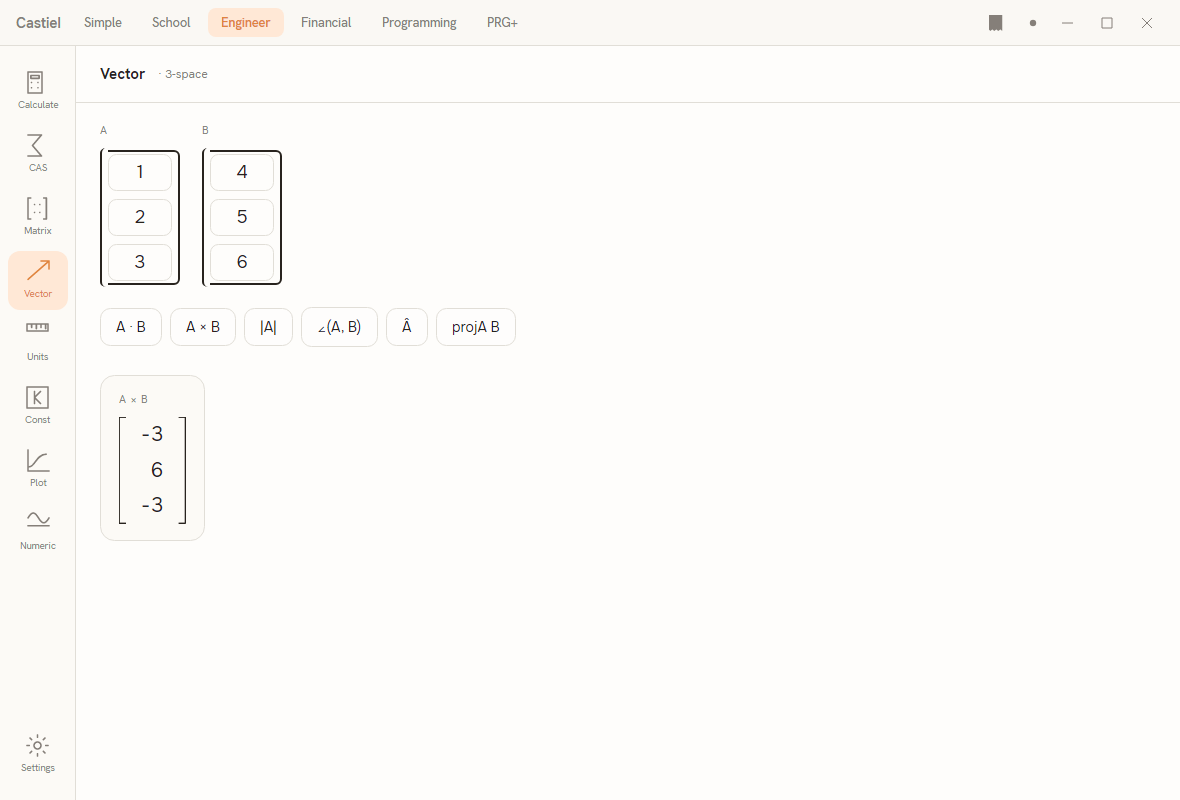
The Vector surface lives in Engineer mode (its header reads Vector · 3-space). For where it sits alongside the matrix tools and how you reach it, see Engineer: matrices and vectors.
The layout. Near the top are two input vectors, A and B, each drawn as a bracketed column of three editable cells - the x, y, and z components stacked top to bottom. Below them is a row of operation buttons: A · B, A × B, |A|, ∠(A, B), Â, and proj_A B. Under that, results appear as cards: a scalar result shows as one large accent value; a vector result shows as its own bracketed column.
Entering vectors. Click any cell and type a number. The surface opens with a worked pair already in place - A = (1, 2, 3) and B = (4, 5, 6) - so you can try an operation immediately, then overwrite the cells with your own numbers. Components can be negative or decimal.
Running an operation. Press one of the operation buttons. The result appears as a card below. Each press clears the previous result and shows the new one. Operations that use only A (magnitude |A| and the unit vector Â) ignore whatever is in B; the rest read both vectors.
Worked examples in Castiel
Example 1 - the dot product. Using the vectors the surface starts with, A = (1, 2, 3) and B = (4, 5, 6):
- Confirm the
Acolumn reads1,2,3from top to bottom and theBcolumn reads4,5,6. Edit the cells if not. - Press the
A · Bbutton. - A scalar card appears showing
32- that is(1×4) + (2×5) + (3×6). Because the value is positive, the two vectors point in broadly the same direction.
Change B to (-2, 1, 0) and press A · B again: the result is 0, which tells you at a glance that (1, 2, 3) and (-2, 1, 0) are perpendicular.
Example 2 - the cross product of two 3-vectors. With A = (1, 2, 3) and B = (4, 5, 6) again:
- Check both columns hold those components.
- Press the
A × Bbutton. - A vector card appears as a bracketed column reading
-3,6,-3- the vector(-3, 6, -3), which is perpendicular to bothAandB.
To confirm the perpendicularity for yourself, you could dot the result back against A: (-3, 6, -3) · (1, 2, 3) = -3 + 12 - 9 = 0. A zero dot product is the right-angle test from the dot product, so the cross product has indeed produced a perpendicular vector. Note also that pressing A × B after swapping the two vectors' contents would give (3, -6, 3) - the same arrow reversed, because order matters for the cross product.
See also
- Engineer: matrices and vectors - the Engineer surface these examples use, and its matrix companion.
- Matrices - the two-dimensional cousin of vectors, and the operations they share.
- Complex numbers - another way of carrying a magnitude and a direction, in the plane.